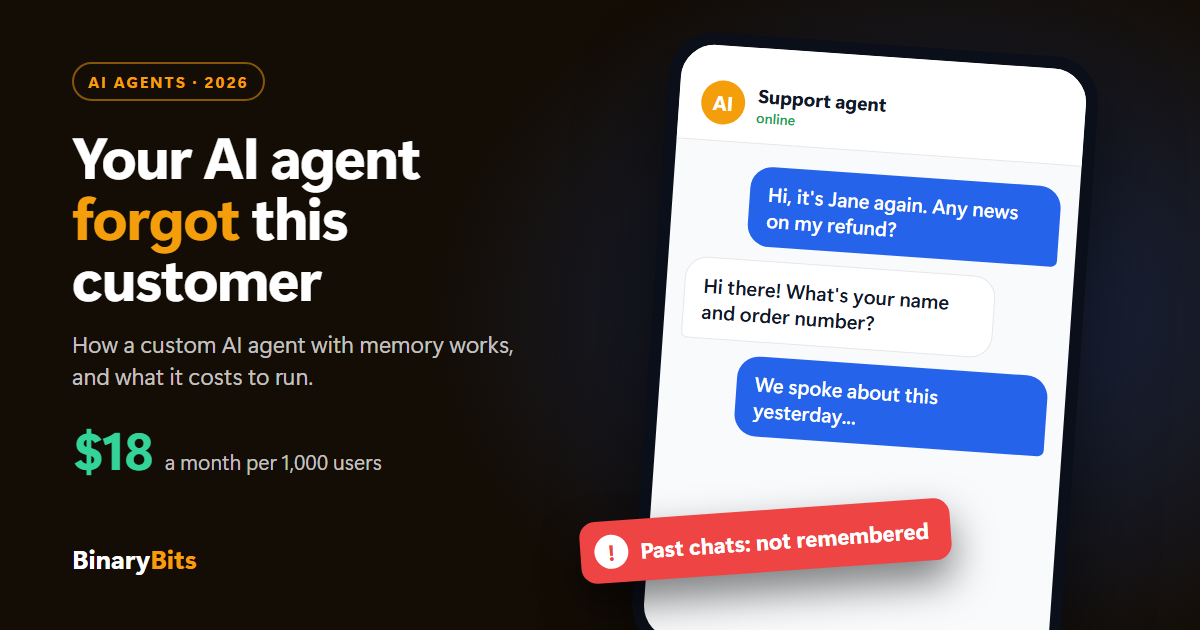
A custom AI agent with memory saves what it learns in each session, like customer preferences, past tasks and decisions, to a database and brings the relevant facts back in later conversations. For most business agents, Postgres with pgvector or mem0 is enough, at about $18 a month per 1,000 active users in our worked example. The hard part is deciding what to remember, and how to delete it.
Below: the four kinds of memory, when you don't need any, the stores worth considering with today's prices, the full cost arithmetic, and what breaks once real users arrive.
💡 What you'll get from this post: a memory-type table, a neutral comparison of eight memory stores, a cost model you can rerun with your own numbers, and a deletion checklist.
Key takeaways
- Four types: session memory, user facts, past tasks and shared knowledge. Most agents need two of them, not all four.
- Not always worth it: in a March 2026 study, a memory layer scored 33–35 points lower than sending the full history, but became cheaper after about 10 turns.
- Running cost: about $18 per 1,000 active users a month when self-hosted (our calculation, assumptions below).
- The cost lever is forgetting: on a per-record store, a memory that never deletes anything grows from $30 to about $360 a month in a year.
- Plan deletion on day one: CCPA gives you 45 days to honor a deletion request, and remembered facts count.
What is a custom AI agent with memory?
It's an agent that keeps information between conversations instead of starting from zero each time. A language model on its own remembers nothing: every request is answered from what's in the prompt. "Memory" is the code and the database around the model that decide what to save and what to put back in the prompt next time.
There are four kinds, and they're built differently:
| Memory type | What it stores | Example in a business agent | Where it usually lives |
|---|---|---|---|
| Session (short-term) | The current conversation | "The order number I gave you two messages ago" | Redis or the app's database, deleted after the session |
| User facts (long-term) | Stable facts about one person or account | "Prefers email, on the Pro plan, ships to Texas" | Postgres + pgvector, mem0, Zep |
| Past tasks (episodic) | What the agent did before and how it went | "Last refund for this customer was approved by a manager" | A log table plus a short summary per task |
| Shared knowledge | Documents everyone's answers draw on | Return policy, product docs, resolved tickets | A vector database used for RAG |
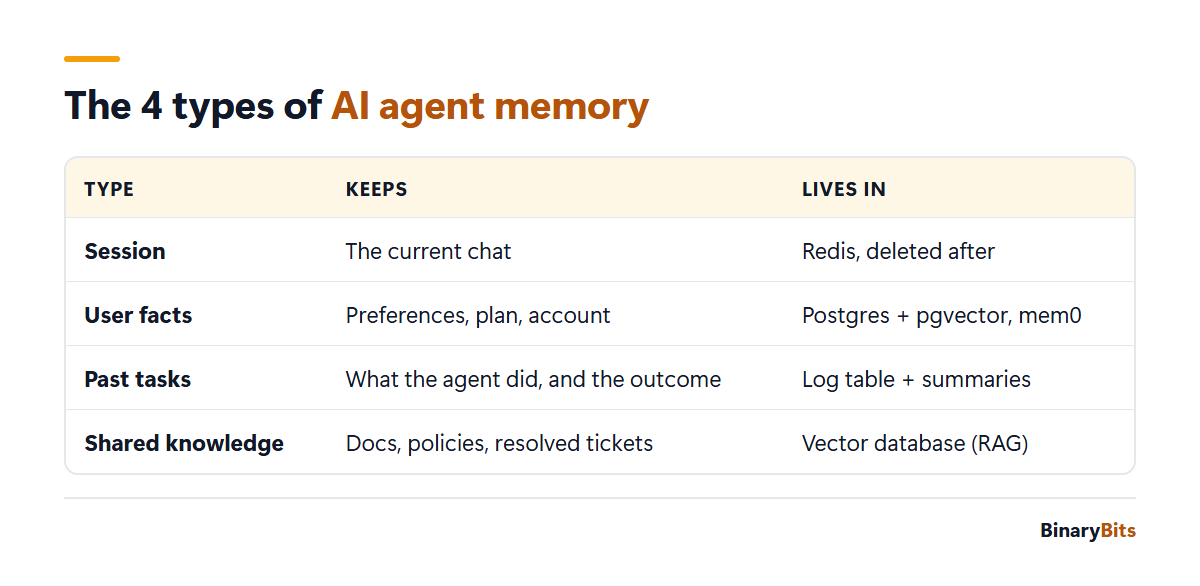
RAG (retrieval-augmented generation: the agent looks things up in your documents before it answers) is the shared-knowledge kind. It isn't personal. Most "memory" questions are really about the second and third rows.
Isn't a bigger context window the same thing?
No. The context window is how much text the model can read in one request. You could paste a customer's entire history into every request, and newer models accept a lot of it. But you pay for every token (a word fragment, the unit models are billed in) on every turn, and the history keeps growing. Memory picks the few facts that matter and sends only those.
Does your AI agent actually need memory?
Often it doesn't. Ask three questions before you budget for it:
- Do the same people come back? A support agent with repeat customers, yes. A website chat where most visitors arrive once, no.
- Do decisions depend on history? "Approve this refund?" depends on past refunds. "What's your return window?" doesn't.
- Is personalization worth real money? Remembering a buyer's preferred supplier saves time. Remembering their favorite color usually doesn't.
If all three answers are no, build a stateless agent (one that keeps nothing between sessions) with RAG over your documents. It's cheaper, easier to test, and there's no personal data to delete.
What does the research say about memory vs. full history?
A March 2026 study compared a mem0-based fact memory with simply sending the whole history to GPT-5-mini. The memory system scored 57.68% against 92.85% on the LoCoMo benchmark and 49.00% against 82.40% on LongMemEval, but became cheaper after about ten turns at a 100,000-token history, and saved about 26% of the total cost by turn 20 (Pollertlam and Kornsuwannawit, arXiv 2026). The trade-off is real: memory is cheaper at scale, and full history recalls more. Short, high-stakes histories can skip memory entirely.
How does AI agent memory work?
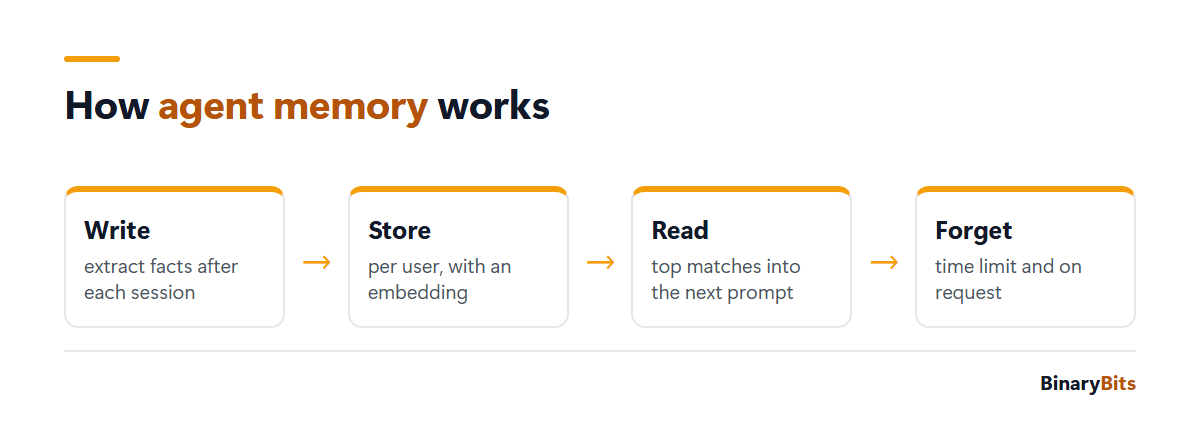
Every memory system, whatever the vendor calls it, runs the same four steps: write, store, read and forget. The figure shows the loop.
How does the agent decide what to remember?
After a session ends, a cheap model reads the transcript and pulls out a handful of facts ("customer switched to annual billing"). This is called extraction. Doing it after the session, not on every message, keeps it off the response time and cuts its cost.
How are memories stored and kept tidy?
Each fact is saved with the user's ID, a timestamp and an embedding (a list of numbers that captures its meaning, so similar facts can be found later). Before saving, the system checks for an existing fact on the same subject and updates it instead of adding a duplicate. This step is called consolidation, and without it memory turns into a pile of contradictions.
How does the agent use memories in a new conversation?
When a session starts, the agent searches that user's memories for the ones closest to the new request, adds the most recent ones, and puts the top five or so into the prompt. The model never sees the rest.
How does an AI agent forget?
Every memory gets a TTL (time to live: a date after which it's deleted) and can be deleted on request. Our lead enrichment agent works this way: each company brief is cached in Redis for 7 days and rebuilt after that, so sales reps never act on a month-old picture. Our AI customer support agent keeps session state in Redis and answers from shared knowledge: product docs, policies and six months of resolved tickets in a vector store.
Where those facts come from matters as much as how they're stored. If your agent also needs live outside data, see how AI agents access real-time data from multiple sources.
Which memory store should you use for an AI agent?
Pick by where your data must live and how much of the memory logic you want to own. Prices below are from each vendor's pricing page on October 6, 2026. They change often, so check again before you sign.
| Store | Self-host? | Best for | What drives the bill |
|---|---|---|---|
| Postgres + pgvector (an add-on that lets Postgres search by meaning) | Yes (open source) | Teams already on Postgres; data must stay in your database | Your own model calls and disk space |
| mem0 | Yes (Apache 2.0) or hosted | Fast user-fact memory with little pipeline work | Hosted: free, $19 or $249 a month by request volume |
| Zep | Hosted; your own cloud on Enterprise | Facts that change over time ("who owned this account before March?") | Credits: $125 a month for 50,000 |
| Letta | Yes, or hosted | Long-running agents that manage their own memory | API plan $20 a month + $0.10 per active agent |
| LangGraph store / LangMem | Yes (open source) | Agents already built on LangGraph | The database underneath and model calls |
| Redis | Yes, or hosted | Session memory and short-lived caches | RAM, so it gets expensive for long-term storage |
| AWS Bedrock AgentCore Memory | No (AWS only) | Teams standardized on AWS | $0.75 per 1,000 stored records a month, $0.50 per 1,000 retrievals |
| Google Vertex AI Memory Bank | No (Google Cloud only) | Agents built with Google's ADK | Memories stored and returned; see Google's price list |
Sources: mem0 pricing and GitHub, Zep pricing, Letta pricing, LangChain long-term memory docs, AWS AgentCore pricing, Google Vertex AI pricing, pgvector.
How much does it cost to add memory to an AI agent?
There are two bills: building the memory layer once, and running it every month. The running bill is small. The build bill depends almost entirely on whether you write the memory logic yourself.
What does it cost to build?
Building production memory from scratch, with storage, consolidation, forgetting and per-user isolation, takes roughly 4–9 engineer-months ($60,000–$135,000), plus about 15–20% of an engineer's time to maintain it, according to SLT Creative's build-vs-buy analysis. Most businesses shouldn't do that. Using an existing store and writing only the rules for your use case is a much smaller job: across our projects, simple agents go live in 1–2 weeks and complex ones in 3–6 weeks, memory included.
What does it cost to run, per 1,000 users?
Here's our own calculation for 1,000 monthly active users, self-hosted on Postgres + pgvector, using OpenAI's list prices on October 6, 2026: gpt-5-mini at $0.25 per million input tokens and $2.00 per million output tokens, and text-embedding-3-small at $0.02 per million (OpenAI pricing).
Assumptions: each user has 8 sessions a month (8,000 sessions). Each session's transcript is about 2,000 tokens. Extraction reads 2,500 tokens and writes 200. Each session saves 5 short memories (40,000 a month), searches memory once, and sends a 500-token memory block with each of 10 turns.
| Cost line | Arithmetic | Per month |
|---|---|---|
| Extraction, input | 8,000 × 2,500 tokens = 20M × $0.25 | $5.00 |
| Extraction, output | 8,000 × 200 tokens = 1.6M × $2.00 | $3.20 |
| Embeddings | 1.6M memory tokens + 0.4M search tokens = 2M × $0.02 | $0.04 |
| Memories in prompts | 8,000 × 10 turns × 500 tokens = 40M × $0.25 | $10.00 |
| Total | before database storage | about $18 |
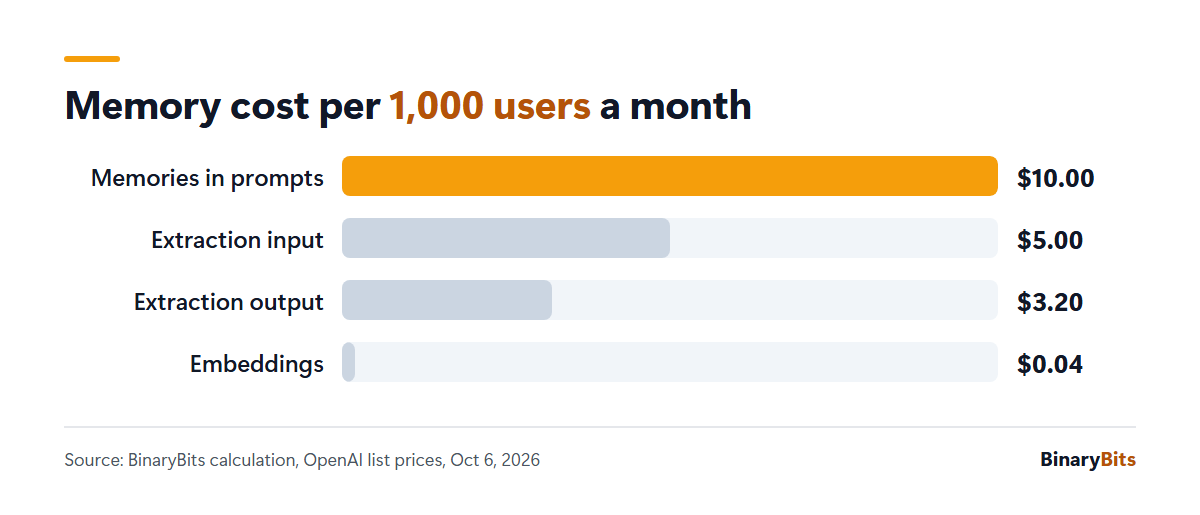
By our arithmetic, that's under 2 cents per user per month. Storage is about 250 MB of new rows a month (each 1,536-number embedding takes about 6 KB in pgvector), which usually fits on the database you already run. Two things move the number: prompt caching can cut the $10 line by up to 90%, since cached input on gpt-5-mini costs $0.025 per million tokens, and a bigger model for extraction multiplies the $8.20.
Why is forgetting the real cost lever?
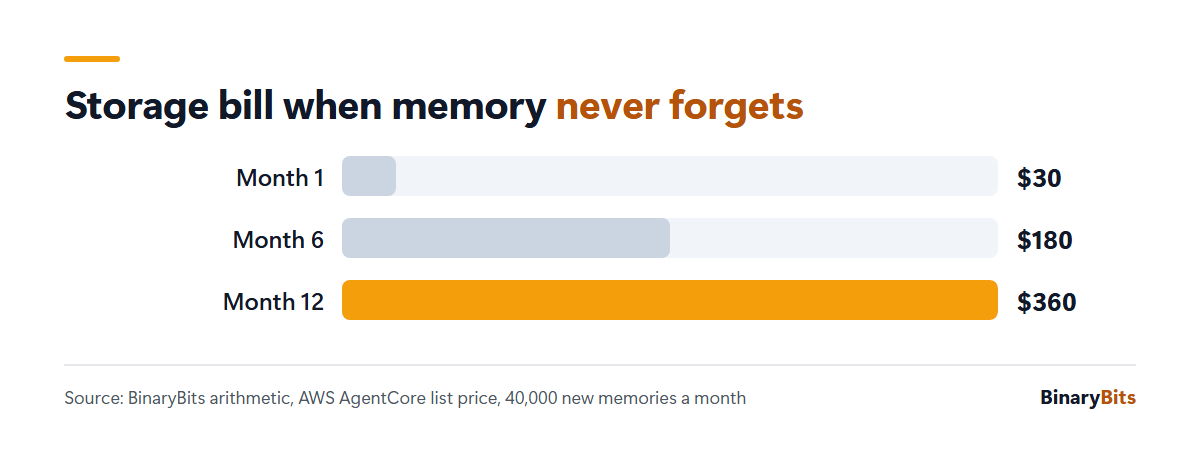
Stores that bill per record charge you for every memory you never delete. On AWS AgentCore's built-in memory at $0.75 per 1,000 records a month, those 40,000 new memories a month cost $30 in month one, $180 by month six and about $360 by month twelve if nothing is ever removed (our arithmetic from AWS's price list). Retrieval adds only $4 a month at one search per session.
Hosted request limits matter too. With one search per session, those 8,000 searches a month go past mem0 Starter's 5,000, which puts you on the $249 Pro plan. Searching only when the request needs history keeps you lower.
Want this arithmetic run on your own user numbers before you commit to a store? Book a free 30-minute call about your AI agent →
What goes wrong with AI agent memory in production?
The same five failures show up across agent builds. Each has a plain fix:
- Stale memories. The agent still thinks a customer is on the trial plan. Fix: a TTL on every memory, and fresher facts ranked above older ones.
- Contradicting facts. "Works at Acme" and "works at Initech" both saved. Fix: consolidation that updates the old fact instead of adding a new one.
- Memory bloat. Prompts grow every month and so does the model bill. Fix: a hard cap on memories per prompt, and summaries for old episodes.
- The wrong user's memory. A search without a user filter returns someone else's facts. Fix: every query filtered by user and account ID in the database itself, and a test that tries to read across accounts.
- Personal data saved without a reason. Health details or card numbers end up in memory because they were in the chat. Fix: an extraction rule listing what may be saved, and a filter for sensitive data before anything is written.
How do you delete what an AI agent remembers?
Design for deletion from the first version, because remembered facts are personal data. Under the CCPA, California consumers can ask a business to delete their personal information, and the business must respond within 45 calendar days, or 90 with notice (California Attorney General). It applies to businesses with over $25 million in annual revenue, among other tests.
For UK and EU users, GDPR Article 17 gives people the right to have their data erased "without undue delay" (GDPR Art. 17). A memory layer that can't find everything stored about one person fails both laws.
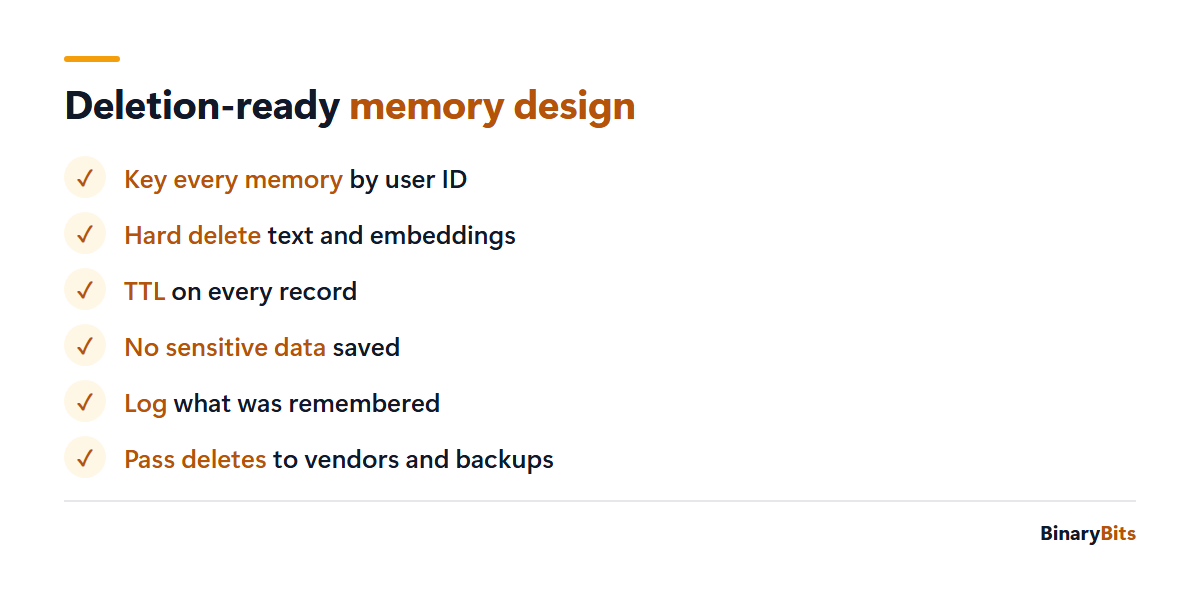
- Key every memory by user ID, so one query finds all of it.
- Hard delete the text and its embedding, not just a "deleted" flag.
- Set a TTL on every record, so data you no longer need disappears on its own.
- Don't save sensitive categories (health, finances, card numbers) unless the use case truly needs them.
- Log what was remembered and when, so you can answer "what do you hold about me?"
- Pass the request on to any hosted memory vendor and clear backups on their normal cycle.
⚠️ Note: This is general information, not legal advice. Check your obligations with a privacy lawyer for your markets.
Should you build a custom AI agent with memory, use a no-code tool, or hire a team?
Match the route to how much the memory matters to the product:
- No-code tool: fine for an internal agent with session memory only. Tools like n8n keep chat history without custom code. See our guide to building a custom AI agent without code.
- Your own team: right when memory is the product, or when you already have engineers who know Postgres and your data.
- Hire a team: right when customer-facing memory has to be correct, isolated and deletable from launch, and nobody in-house has built one. Our notes on deploying AI agents at a startup cover what to scope first.
How do you build a custom AI agent without complex data engineering?
Start with the store you already run. If your app is on Postgres, add pgvector and one memory table, and use an open-source library for extraction. That avoids a new database, a new vendor and a new place where personal data lives.
Planning an AI agent that remembers your customers?
We design and build custom AI agents with memory that's scoped, isolated per customer and deletable, on the database you already use. 200+ projects delivered across 10+ countries.
Frequently asked questions
What is a custom AI agent with memory?
It's an AI agent built for your business that saves useful facts from each conversation, like preferences, past orders or earlier decisions, and brings the relevant ones back in later sessions. The model itself remembers nothing; a database and a few rules around it decide what to save, what to retrieve and when to forget.
How does AI agent memory work?
It runs four steps. After a session, a model extracts key facts. They're stored with the user's ID and an embedding so similar facts can be found. At the next session, the closest and most recent facts are added to the prompt. Finally, a time limit or a deletion request removes facts that are no longer needed.
What is the difference between short-term and long-term memory in an AI agent?
Short-term memory is the current conversation: what the user said a few messages ago. It's usually kept in Redis or the app's database and thrown away when the session ends. Long-term memory survives between sessions: user facts, past tasks and outcomes. It needs a proper store, search, consolidation and a deletion process.
What is the best AI agent memory framework in 2026?
There isn't one best framework. mem0 is a quick start for user facts, Zep handles facts that change over time, Letta suits long-running agents, and LangMem fits teams already on LangGraph. If your data must stay in your own database, Postgres with pgvector plus your own extraction rules is often the simplest choice.
How much does it cost to add memory to an AI agent?
Running it is cheap: about $18 a month per 1,000 active users in our self-hosted worked example using gpt-5-mini. Building memory infrastructure from scratch can take 4–9 engineer-months, so most teams use an existing store and only write the rules for their use case, which fits inside a normal agent build.
Is a vector database required for AI agent memory?
Not always. Short-term memory needs none, and a small set of user facts can live in an ordinary table. Search by meaning becomes useful once each user has dozens of memories. Even then, you rarely need a separate product: pgvector adds vector search to the Postgres database many apps already use.
How do you delete a user's data from an AI agent's memory?
Key every memory by user ID, so one query finds everything stored about that person. Then hard delete the text and its embeddings, pass the request to any hosted memory vendor, and let backups expire on their normal cycle. Under the CCPA you have 45 calendar days to respond to a verified deletion request.
How many engineers does it take to build a customer-facing AI agent?
A focused build usually needs one or two engineers: one for the agent logic and prompts, one for integrations and the data layer. In our projects, simple agents go live in 1–2 weeks and complex ones in 3–6 weeks. Building your own memory infrastructure from scratch is a much bigger job of several engineer-months.