You've probably heard that AI can handle customer queries, qualify leads, summarise reports, and even make decisions on your behalf. And you've probably wondered: is that actually something my business can use, or is it only for companies with a full engineering team?
The honest answer: most business owners can build a working AI agent without writing a single line of code. The tools available in 2026 have changed the game entirely. What used to require a developer and 3 weeks of setup now takes an afternoon.
💡 What you'll get from this post: A clear, jargon-free breakdown of what an AI agent actually is, the no-code tools you can use today, and a step-by-step process to build one for your specific business decision, from customer support to lead routing to invoice approvals.
TL;DR
- An AI agent is a system that takes a goal, breaks it into steps, and acts, not just answers a question.
- No-code tools like n8n, Make, and Voiceflow let you build agents without touching code.
- The best agents for non-technical founders handle one decision loop well, not everything at once.
- Most businesses can go from idea to working prototype in under 4 hours with the right setup.
- Custom-built agents (with engineering support) are worth it when the volume justifies the investment, usually 200+ decisions per day.
What Is an AI Agent? (The Version That Actually Makes Sense)
Start with the simplest explanation. A chatbot answers questions. You ask, it responds. Every exchange is isolated.
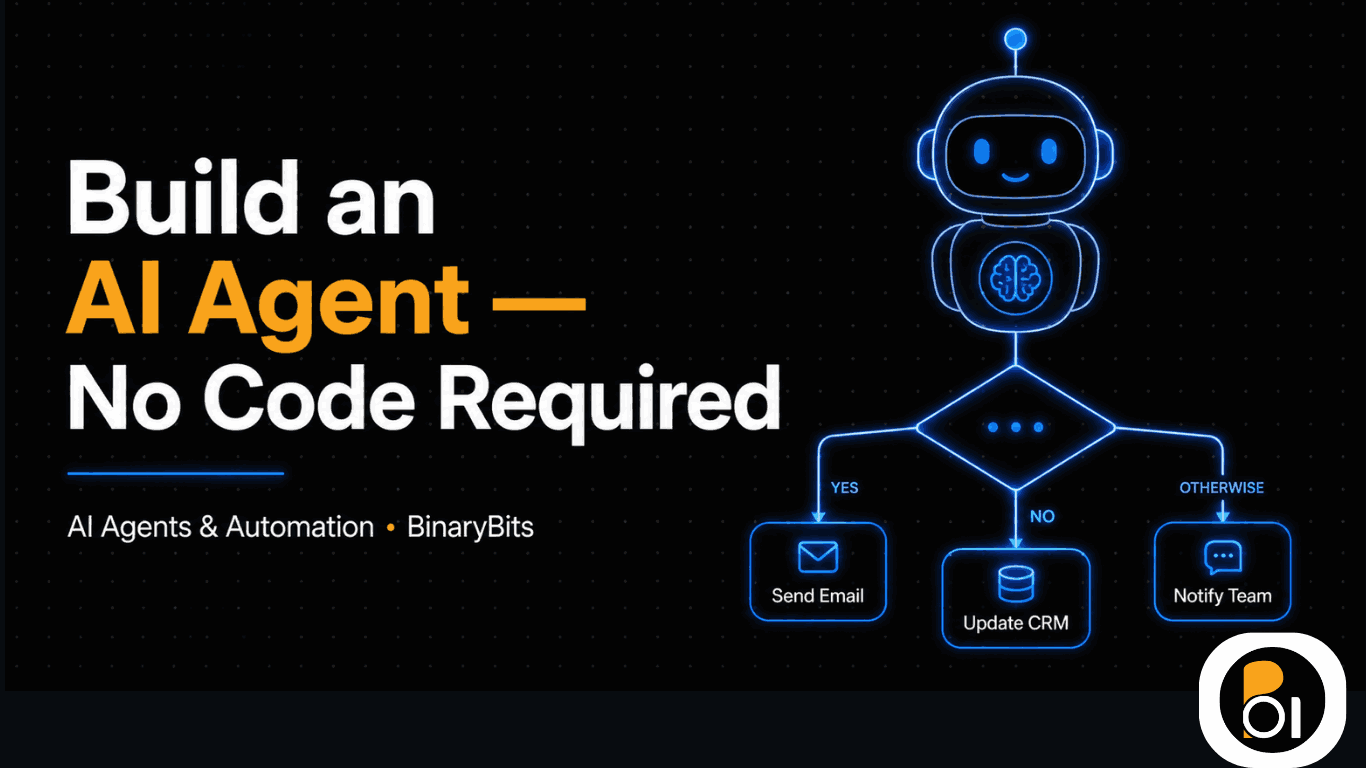
An AI agent is different. You give it a goal, "qualify new leads and book a call if they fit our criteria", and it figures out the steps, executes them in sequence, and adjusts if something doesn't go as expected. It pulls data, makes a decision, takes an action, and moves on to the next task. All without you clicking anything.
The technical name for this capability is multi-step reasoning. But for your business, what it means is simpler: an AI agent can replace a repeatable human decision, not just answer a question about it.
Three Things That Make an Agent Different from a Chatbot
- It takes actions, not just answers: An agent can send an email, update a CRM record, or book a calendar slot, a chatbot can only tell you it should be done.
- It works across multiple steps: One prompt → one response is a chatbot. Goal → plan → step 1 → step 2 → result is an agent.
- It handles decisions, not just information: The agent evaluates inputs (a form submission, an email, a data row) and decides what happens next based on rules you define.
The 5 Types of AI Agents Most Businesses Actually Use
Before you build anything, it helps to know which category your use case falls into. In our work across 200+ projects, these five types cover 90% of what small and mid-size businesses actually need.
1. Customer Support Agent
Handles tier-1 support queries, password resets, order status, policy questions, refund eligibility, without routing to a human. Escalates when it can't confidently answer. We built one for a SaaS client that deflected 68% of support tickets in the first 30 days. You can read the full breakdown in our AI customer support case study.
2. Lead Qualification Agent
Reviews inbound leads from your forms or CRM, scores them against your ideal customer profile, and either books a call automatically or sends a personalised follow-up. Cuts average lead response time from hours to under 3 minutes.
3. Data Processing Agent
Takes structured or unstructured input, a PDF, a spreadsheet, a web form, and extracts, classifies, or transforms it. Common use: reading supplier invoices and routing them to the right department with a decision recommendation.
4. Internal Decision Agent
Handles repeatable internal approvals. Leave requests, expense sign-offs, content calendar approvals. Pulls context from your data, checks against your rules, and either approves automatically or flags for human review. We built an internal approval agent for a logistics company that eliminated 12 hours per week of manager time.
5. Research & Monitoring Agent
Watches something, competitor pricing, job postings, social mentions, industry news, and surfaces relevant changes with a recommendation. Doesn't just collect data; tells you what to do with it.
No-Code Tools You Can Use Right Now (Honest Comparison)
You don't need to hire a developer to build your first agent. These tools have good free tiers and visual interfaces that non-technical founders use every day.
| Tool | Best For | Learning Curve | Free Tier | Limitation |
|---|---|---|---|---|
| n8n | Business workflow automation with AI steps | Medium (3–5 hours to get comfortable) | Yes (self-hosted is free) | Requires a server for self-hosting; cloud version costs ~$20/month |
| Make (Integromat) | Connecting apps + simple decision logic | Low (visual and drag-drop) | Yes (1,000 operations/month) | AI logic is shallow, better for routing than complex reasoning |
| Voiceflow | Customer-facing voice or chat agents | Low–medium | Yes (limited) | Not ideal for backend data tasks |
| Zapier (AI features) | Simple trigger-action flows with AI text steps | Very low | Yes (100 tasks/month) | AI steps are basic; limited for multi-step reasoning |
| Relevance AI | Building AI agents with a form-based interface | Low–medium | Yes (limited runs) | More expensive at scale; limited customisation |
For most non-technical founders, n8n paired with an OpenAI or Claude API key gives the best balance of flexibility and cost. Make is a better starting point if you just want something working in an hour.
Step-by-Step: Building Your First AI Agent (No Code)
Here's the exact process we walk clients through when they want to build their first agent before committing to a custom build.
Step 1: Pick One Decision to Automate
Don't start with "automate my whole sales process." Start with one decision that happens at least 5–10 times per day. Examples: "Should I reply to this lead or ignore it?" / "Which support ticket needs a human?" / "Does this invoice need approval?" One decision, repeated, is where agents deliver real ROI.
Step 2: Map the Decision on Paper First
Write out: what inputs does the decision need? What are the possible outcomes? What action follows each outcome? This takes 15–20 minutes and saves hours of rework. Example: Lead qualification agent inputs = company size, job title, geography. Outcomes = qualified (book call), nurture (add to sequence), disqualify (do nothing). Actions = calendar invite, HubSpot tag, no action.
Step 3: Choose Your Tool and Set Up the Trigger
Pick n8n or Make based on the table above. Set up the trigger, the event that starts the agent running. Common triggers: a new row in a Google Sheet, a form submission, an inbound email, a webhook from your CRM.
Step 4: Add the AI Reasoning Step
In n8n, this is the "OpenAI" or "Claude" node. Write a prompt that describes: the goal, the inputs it will receive, the criteria for each decision, and the output format you want. Be specific. "If company size is 10–200 and job title contains CTO, CEO, or Founder, output QUALIFIED. Otherwise output NURTURE." Vague prompts produce vague decisions.
Step 5: Connect the Actions
Wire each decision outcome to an action: send an email via Gmail, update a field in HubSpot, add a row to a spreadsheet, post a Slack message. This is where the magic is, the agent doesn't just decide, it acts.
Step 6: Test with Real Data, Not Ideal Data
Run your agent against 20–30 real examples from your history. See where it gets it wrong. Adjust the prompt. Retest. Most agents need 2–3 rounds of prompt tuning before they're reliable enough to run unsupervised.
Step 7: Add a Human Review Layer (At Least Initially)
For the first 2 weeks, set up a Slack or email notification for every decision the agent makes. You're not second-guessing it, you're catching the edge cases your prompt didn't anticipate. After 2 weeks of monitoring with less than 5% corrections, you can let it run fully autonomously.
If you'd rather have an engineer build and test this properly from day one, our AI agents service covers the full build, from workflow design to production deployment.
When No-Code Isn't Enough: Signals You Need a Custom Build
No-code tools are genuinely powerful. But there are situations where they hit a ceiling fast.
- Volume above 500 decisions/day: Most no-code tools charge per operation. At scale, the cost per decision adds up quickly, and performance degrades. A custom-built agent on your own infrastructure is typically cheaper above this threshold.
- Complex data sources: If your agent needs to read from a proprietary database, scrape external websites, or process unstructured PDFs reliably, no-code tools struggle. They're built for clean, structured data flows.
- Compliance or data sensitivity: If you're in healthcare, legal, or finance, sending customer data through a third-party automation platform may violate GDPR or sector regulations. A self-hosted agent on your own cloud is the safer choice.
- Multi-agent orchestration: When one agent's output needs to trigger another agent (e.g. a research agent feeds a content agent which feeds an approval agent), no-code tools become fragile. Custom orchestration handles this more reliably.
The honest version: if you're making fewer than 200 decisions per day and the data is relatively clean, start no-code. If you're at scale or dealing with messy data, a custom build pays for itself within 3–4 months.
What Can Go Wrong (And Usually Does)
We've helped dozens of founders build their first agents. These are the mistakes that come up every time.
Mistake 1: Starting with a vague goal. "Automate my customer service" is not a goal an agent can act on. "Reply to emails asking about our refund policy within 10 minutes with the correct policy text and a calendar link" is. The more specific your goal, the better the agent performs.
Mistake 2: Trusting the agent too early. We've seen founders turn off human review after day 3 because "it seems to be working." Two weeks later, the agent has been mis-routing leads for 10 days and nobody noticed. Monitor for at least 2 weeks before going fully autonomous.
Mistake 3: Not accounting for edge cases in the prompt. Your prompt defines the rules. If you didn't write a rule for a rare situation, the agent will guess, and often guess wrong. After your first test run, write down every case it got wrong and update the prompt to address it explicitly.
Mistake 4: Building on the wrong trigger. If your trigger is unreliable (e.g. a Google Sheet that people forget to update, or an email inbox that gets spam), the agent's reliability suffers immediately. Fix the trigger before blaming the agent.
The Honest Limitations of AI Agents (As of 2026)
Agents are powerful, but not unlimited. Know these boundaries before you rely on one.
- They don't learn from mistakes automatically. Unlike a human employee, an AI agent doesn't update its own behaviour when it gets something wrong. You need to update the prompt manually after catching errors.
- They hallucinate under uncertainty. If an agent is given inputs it wasn't trained to handle, it will often generate a plausible-sounding but wrong answer rather than saying "I don't know." Always test edge cases before going live.
- They're only as good as their data access. An agent that can't access up-to-date information makes outdated decisions. Make sure your data sources are fresh and connected correctly.
- They can't replace judgment in novel situations. Routine decisions, yes. Genuinely unusual situations, a customer with an edge case complaint, a vendor negotiation, still need a human.
Want Help Building Your First AI Agent?
We design and build custom AI agents for startups and growing businesses, from simple workflow automation to multi-agent systems handling thousands of decisions per day. No unnecessary complexity, no overengineering.
Show Me What Can Be Automated →Frequently Asked Questions
What is a custom AI agent for business?
A custom AI agent is an automated system built specifically for your business that takes a defined goal, processes relevant inputs, makes a decision based on your rules, and takes an action, all without human intervention. Unlike generic chatbots, a custom agent is trained on your criteria, connected to your data, and designed around your specific workflow.
Do I need coding skills to build an AI agent?
No. Tools like n8n, Make, and Voiceflow let you build functional AI agents using visual, drag-and-drop interfaces. You connect triggers (like a new email or form submission), add an AI reasoning step using a clear prompt, and wire it to an action (like sending a reply or updating your CRM). Most non-technical founders get a basic agent running within 3–4 hours.
How much does it cost to build an AI agent?
A no-code agent using n8n (self-hosted) costs roughly $0–$30/month depending on your AI API usage and hosting. A cloud-hosted no-code setup (Make or Zapier) runs $20–$80/month at typical volumes. A custom-built agent developed by an engineering team typically costs $2,000–$8,000 depending on complexity, and is worth it when you're handling 500+ decisions per day or need compliance-level reliability.
What decisions can an AI agent automate?
Any decision that follows consistent rules and happens repeatedly. Common examples include lead qualification (qualified or not, based on job title and company size), support ticket routing (human escalation vs auto-reply), invoice approval (within policy vs flag for review), and content scheduling (publish now, schedule later, or send for revision). If a new employee could learn the decision from a one-page document, an AI agent can probably handle it.
How is an AI agent different from a chatbot?
A chatbot responds to a single question with a single answer, the conversation resets each time. An AI agent pursues a goal across multiple steps, takes real actions (sends emails, updates databases, books calendar slots), and makes decisions based on data, not just conversations. Think of a chatbot as an FAQ responder. Think of an agent as a junior employee who can follow a process from start to finish.
When should I hire engineers to build my AI agent instead of using no-code tools?
Build custom when: you're processing more than 200–500 decisions per day (no-code costs stack up), you need to connect to proprietary databases or unstructured data sources, you're in a regulated industry where data can't flow through third-party platforms, or you need multiple agents working together in a pipeline. If you're unsure, book a free 30-minute call, we'll tell you honestly which approach fits your situation.