
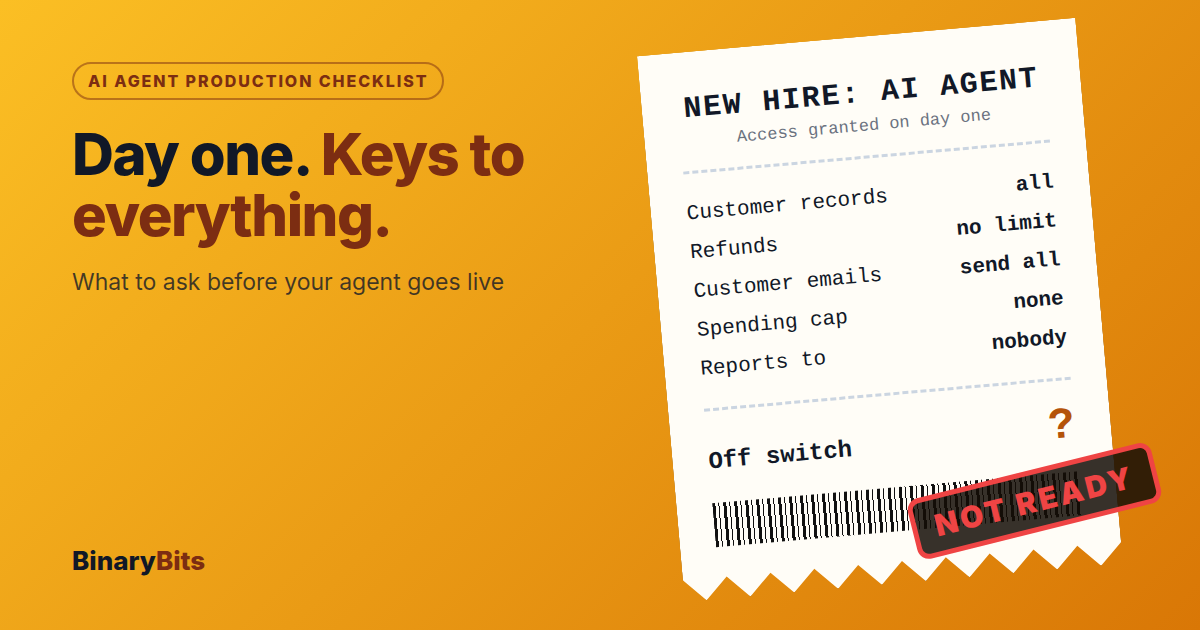
An AI agent production checklist answers seven questions before launch: what the agent can touch, which actions need a person's approval, how much it can spend, when it hands over to a person, what it logs, how it's re-tested after changes, and who can switch it off. If you can't get a clear answer to each from whoever builds it, the agent isn't ready to go live.
Most checklists on this are written for the engineer building the agent. This one is for the business paying for it: the questions to put to your build team, and who owns each check once the agent is live.
💡 What you'll get from this post: ten questions to take into the go-live meeting, and a table that shows who owns each check after launch.
TL;DR
- Limit access: the agent gets only the data and tools its one job needs.
- Gate the risky actions: refunds, customer emails and record changes wait for a person until the agent has earned trust.
- Cap spending: a limit per task and per day, with an alert before the daily limit is hit.
- Plan the hand-over: which cases go to a person, and who picks them up out of hours.
- Own the evidence: the logs, the test set and the off switch should be yours, not only the builder's.
What does "production ready" mean for a business AI agent?
An AI agent is software that reads a request, decides what to do and then acts, for example by looking up an order and starting a refund. "Production ready" means it can do that with real customers and real money, and you can see and stop what it does.
The UK's National Cyber Security Centre puts the test in one line: "If you cannot understand, monitor or contain an agent's actions, it is not ready for deployment" (NCSC, May 2026). It also advises starting with small, low-risk tasks and giving the agent the least access it needs.
Why does this matter before launch, not after?
Because the projects that fail usually fail on cost and control, not on the AI. Gartner predicts over 40% of agentic AI projects will be canceled by the end of 2027 because of escalating costs, unclear business value or inadequate risk controls (Gartner). Two of those three reasons are on this checklist.
What should be on an AI agent production checklist?
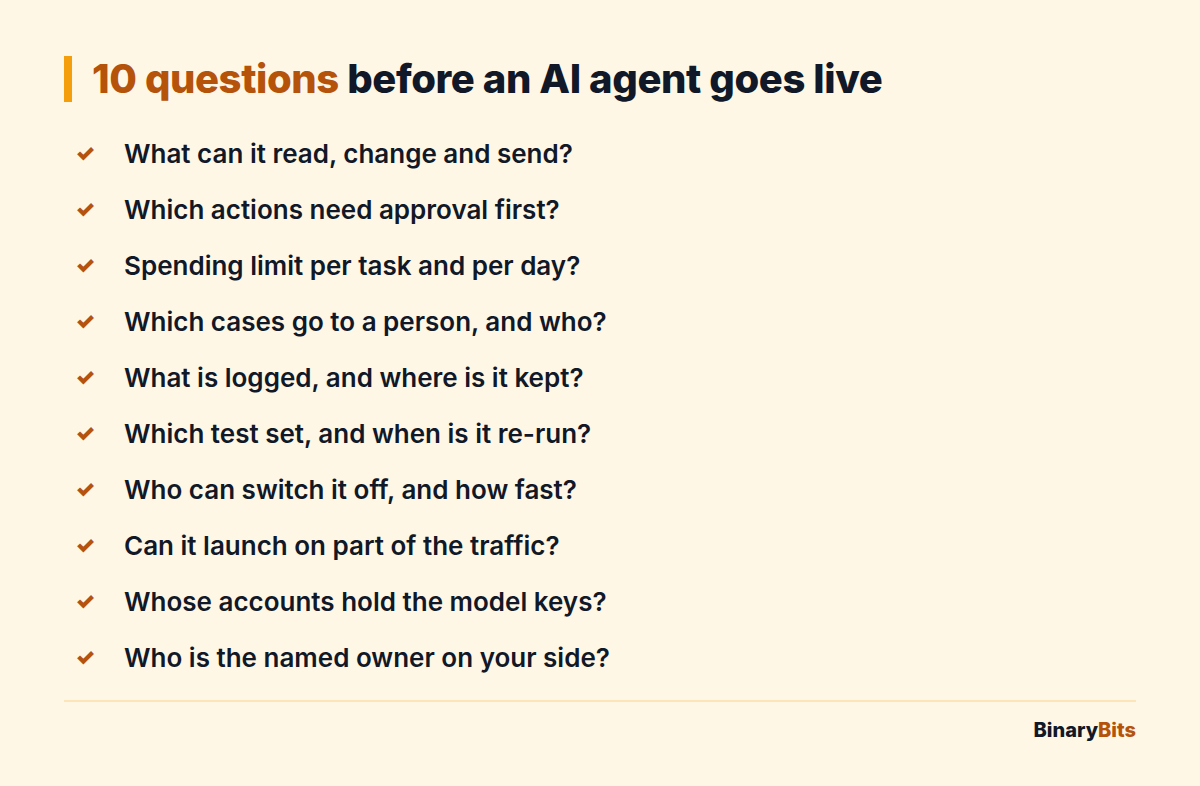
Ten questions. Ask them in the go-live meeting, and ask for each answer in writing.
- What can the agent read, change and send?
- Which actions need a person's approval first?
- What is the spending limit per task and per day?
- Which cases go to a person, and who picks them up?
- What gets logged, and where are the logs kept?
- What test set is it checked against, and when is it re-run?
- Who can switch it off, and how fast?
- Can it go live on part of the traffic first?
- Whose accounts hold the AI model keys and the bills?
- Who is the named owner on your side after launch?
Developer-side lists such as MindStudio's production checklist cover how to build each check. Your job is to make sure each one exists and has an owner.
1. What can the agent read, change and send?
Ask for a list of every system the agent connects to, and for each one whether it can read, change or send. A support agent needs to read orders. It almost never needs to delete customers.
OWASP, the security group behind the best-known list of AI risks, calls this "excessive agency": damage that happens because an agent has too many functions, too many permissions or too much freedom to act alone (OWASP). The fix is boring and it works: separate accounts for the agent, with the smallest rights that do the job.
What should you ask for in writing?
- A list of connected systems, with read, change or send against each.
- A separate login or API key (the password one system uses to talk to another) for the agent, never a staff member's.
- What data leaves your systems, and which AI model company receives it.
- How it handles prompt injection: a customer message or web page that tries to give the agent new instructions.
2. Which actions need a person's approval first?
Sort every action by two things: can it be undone, and what does it cost if it's wrong? Looking up an order is free and harmless. Refunding $400 or emailing every customer is neither.
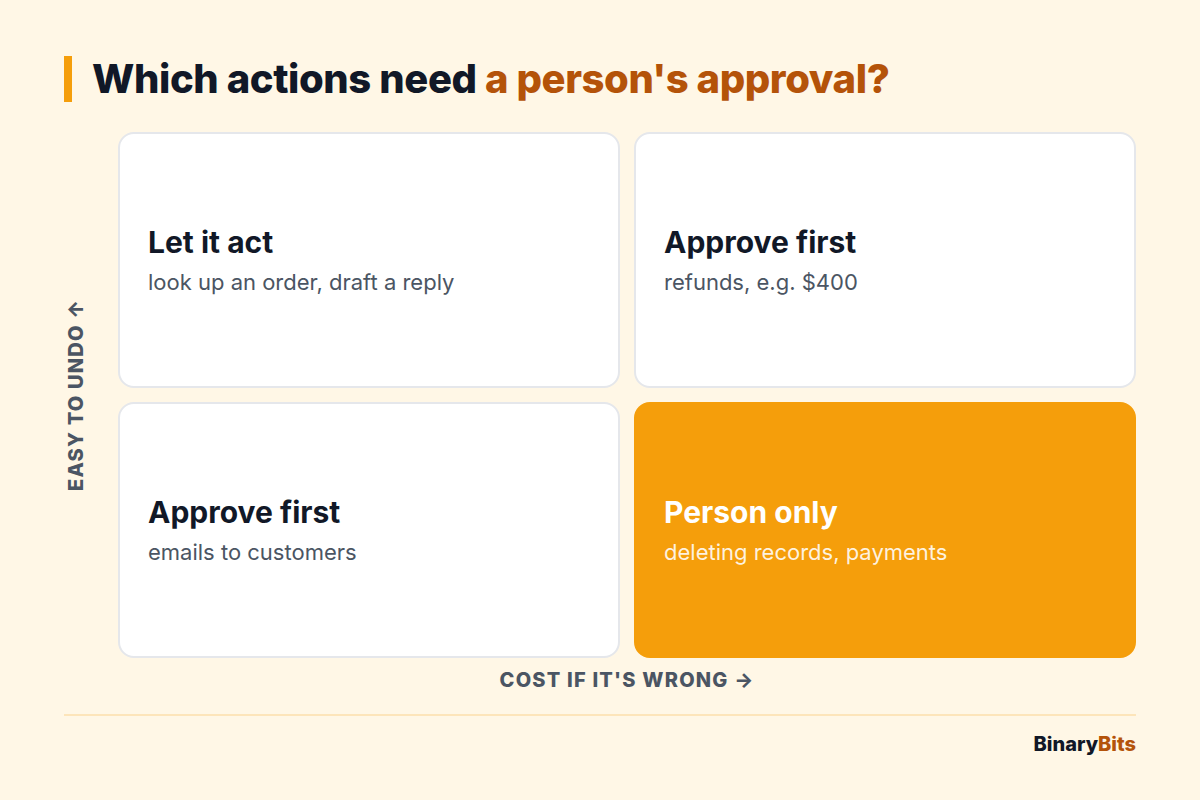
Start strict. Put anything costly or irreversible behind an approval button, then relax the rule for one action at a time once the logs show the agent gets it right. On our own AI agent builds the rule is simple: agents propose, your team approves anything risky.
3. How much can it spend per task and per day?
Every step an agent takes calls an AI model, and each call costs money. An agent that loops on a confusing request can make hundreds of calls before anyone notices. Spending caps stop that.
What actually drives the cost of running AI agents in production?
Mostly volume and steps: how many requests a day, how many model calls each one takes, and how much text goes in each call. Long documents and long conversation histories cost more than short questions. Our AI agent cost calculator shows typical build and running ranges by agent type.
How do you set the limits?
- Per task: measure the average cost per task in testing, then cap each task at a few times that.
- Per day: expected daily volume times the per-task cap, plus a margin for busy days.
- Alert: a message to a named person well before the daily cap is reached, not after.
Ask your builder what happens when a cap is hit. The right answer is that the task stops cleanly and goes to a person, not that it fails silently.
4. When does it hand over to a person, and who picks it up?
Every agent needs written rules for when it stops and passes the case on. The usual triggers are low confidence in its own answer, an upset customer, legal or fraud topics, and anything over a money limit.
- Which cases: list the triggers, not "when it's unsure".
- To whom: a named team or inbox, with the full conversation attached.
- Out of hours: who sees a hand-over at 2 a.m., and what the customer is told meanwhile.
5. What gets logged, and who keeps the logs?
Each run should record the request, the steps the agent took, every tool it called, what it answered and who approved what. Without that you can't explain a mistake to a customer or show a regulator what happened.
Ask where the logs live and whether you can read them without asking the builder. If the logs sit only in the builder's account, you lose them when the contract ends. Remove personal data from logs you don't need it in.
6. How do you know it still works after a model or prompt change?
With a test set: a fixed list of real past cases with the right answer for each, run before launch and again after every change. AI model companies update and retire model versions, and a small prompt edit can change behavior in ways nobody predicted.
- Build the test set from your own cases, not made-up ones.
- Re-run it after any change to the model, the instructions (the prompt) or the tools.
- Agree the pass mark before launch, so "good enough" isn't decided on the day.
7. Can you switch it off yourself?
You should be able to pause the agent in under a minute without calling anyone. Ask to see the off switch, and ask what happens to the requests in flight: they should go to people, not disappear.
Can it go live on part of the traffic first?
Yes, and it should. Sending a share of requests to the agent while people handle the rest lets you compare quality side by side and roll back without drama.
Who owns what after launch?
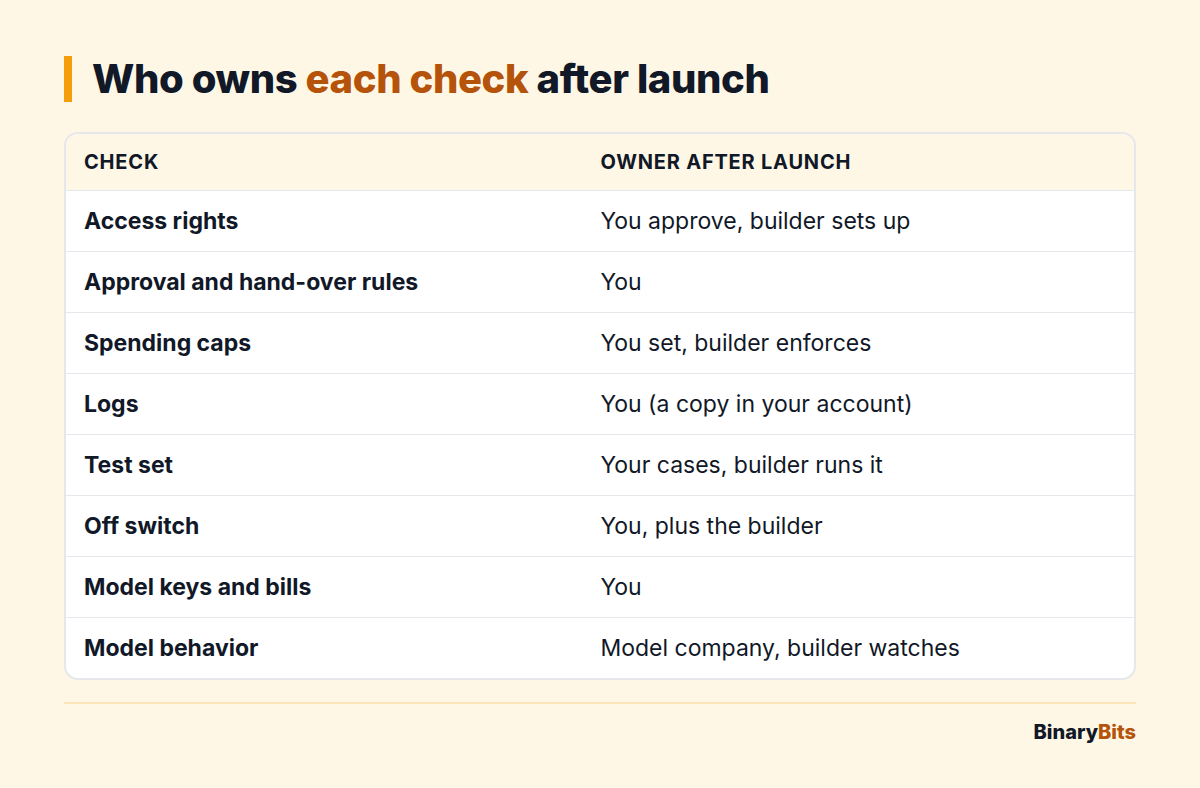
This is the question most go-live meetings skip. Questions-to-ask-vendors lists such as TechTarget's are written for agents inside software you rent. When an agent is built for you, settle ownership yourself.
| Check | What to ask the builder | Who should own it after launch |
|---|---|---|
| Access rights | Which systems, read or change or send? | You approve; builder sets up |
| Approval rules | Which actions wait for a person? | You |
| Spending caps | Per task, per day, alert to whom? | You set; builder enforces |
| Hand-over rules | Which triggers, which queue, out of hours? | You |
| Logs | Where kept, how long, can we read them? | You (a copy in your account) |
| Test set | Which cases, what pass mark, when re-run? | Shared: your cases, builder runs it |
| Off switch | Who can pause it, how fast? | You, plus the builder |
| Model keys and bills | Whose account pays the AI model company? | You |
| Model behavior | Which model version, what if it's retired? | Model company; builder watches |
If you're still choosing who builds the agent, our guide to picking a custom AI agent development company covers that step. If you'd rather have an engineer work inside your team through launch, read what a forward deployed engineer does.
Have an agent close to launch and want a second pair of eyes on these checks? Talk to our AI agent team →
How did we build these checks into a support agent?
This is a past project, written up as our AI customer support case study. An e-commerce brand had 800-1,200 support tickets a day. We built an agent that answers from the store's own help content and order data, and can start returns, send tracking and update addresses.
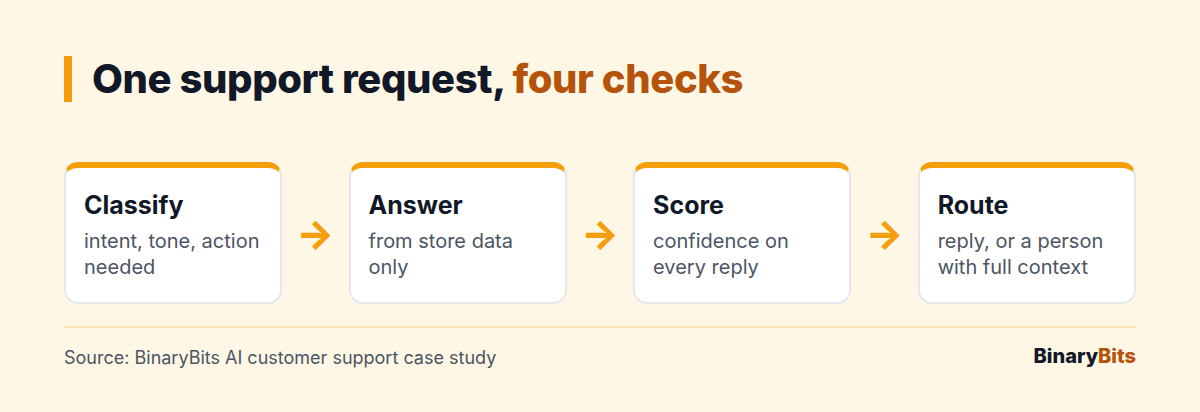
- Answers from the store's data only: replies are written from retrieved help content and order data, and can't go beyond it.
- A confidence score on every reply: below the threshold, the ticket goes to a person with the full conversation.
- Fixed hand-over rules: complaints and upset customers always go to a person, and so do legal and fraud questions.
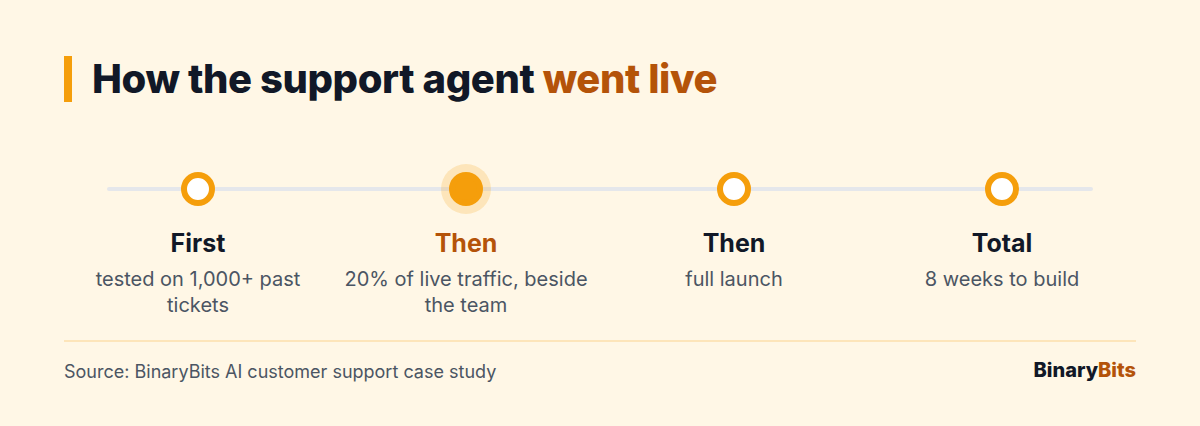
- Tested on the past first: the hand-over logic was run against 1,000+ historical tickets before any customer saw it.
How was it launched?
On 20% of traffic first, running beside the human team so quality could be compared side by side, then to everyone (details in the support agent case study). In that project the agent went on to resolve 70% of queries without a person, and the build took 8 weeks. Those are one client's past results, not a promise for yours.
What doesn't this checklist cover?
It won't tell you whether the agent is worth building, and it isn't legal advice. If the agent handles personal data, check your data-protection duties and the AI model company's data terms with someone qualified. And a checklist only works if someone on your side reads the logs every week after launch.
⚠️ Note: This is general information, not legal advice.
We build agents with these checks from day one
We build AI agents for support, sales and operations, with approvals, spending caps, logs and an off switch you own. Simple agents go live in 1-2 weeks, and you get a written proposal within 24 hours of the call.
Frequently asked questions
Do I need a human in the loop for every action?
No. Put a person in front of actions that are costly or can't be undone, such as refunds, payments, customer emails and record changes. Let the agent act alone on cheap, reversible tasks like looking up an order or drafting a reply. Start strict, then remove approvals one action at a time once the logs show the agent handles that action correctly.
How do I stop an AI agent from overspending?
Set two limits and one alert. Cap each task at a few times the average cost you measured in testing, cap each day at your expected volume times that, and alert a named person well before the daily cap is reached. When a cap is hit, the task should stop cleanly and go to a person, not fail silently or keep retrying.
What should an AI agent log?
Every run should record the incoming request, each step the agent took, every tool or system it called, the answer it gave, and any approval a person made. Keep a copy in an account you control, decide how long to keep it, and remove personal data you don't need. Logs are what let you explain a mistake and fix it.
Who is responsible when an AI agent makes a mistake?
Your business, in the eyes of your customers. That's why the approval rules, hand-over rules and spending caps should be decided by you and written down, even if the builder implements them. Agree in the contract who fixes what, how fast, and who pays for model costs caused by a bug. This is general information, not legal advice.
How often should an AI agent be re-tested?
Run the full test set before launch and again after every change to the AI model, the prompt or the tools the agent uses. Also run it on a fixed schedule, such as monthly, because AI model companies update and retire model versions. Review a sample of real conversations each week, and add any new failure to the test set.
What is the easiest way to get an AI agent running in production for a small team?
Pick one repeated task with a clear right answer, such as sorting support tickets or drafting replies for approval. Give the agent read-only access first, require approval for every action, and launch on part of the traffic. A simple single-task agent typically takes 1-2 weeks to build. Widen its freedom only after the logs prove it works.