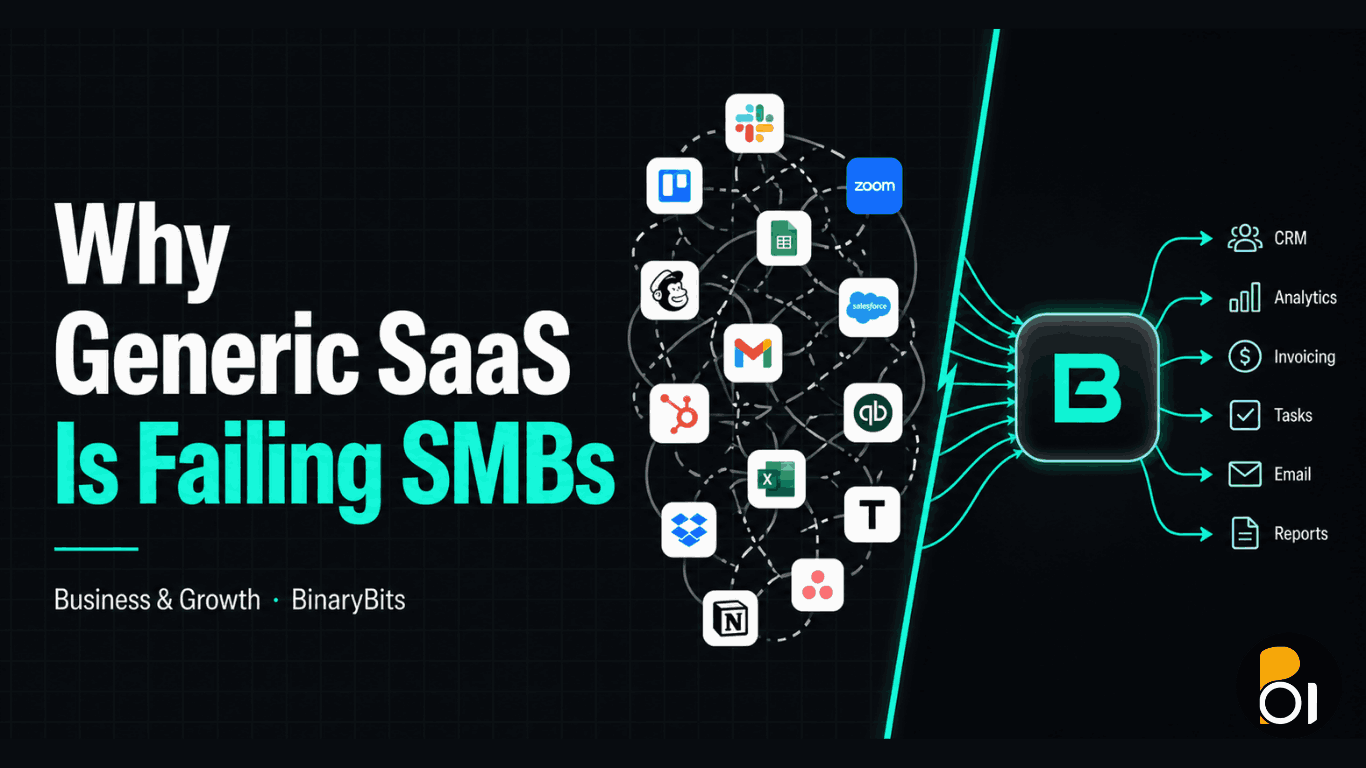
You signed up for five SaaS tools this year. Maybe ten. Each one seemed like the right call at the time. But now your team switches between platforms all day, your data lives in three places at once, and you are paying for seats nobody uses. The software was supposed to make things easier. It has not.
This is not a vendor problem. It is a fit problem. Generic SaaS is built for the middle of the market, not for how your specific business actually runs. And for small and medium businesses with real operational complexity, that gap between what the tool does and what you actually need is costing more than most owners realise.
What you will get from this post: A clear look at why off-the-shelf SaaS creates hidden costs for SMBs, what custom SaaS actually delivers, which industries benefit most, and a decision framework for knowing when to build versus buy.
TL;DR
- The average SMB runs 87 SaaS apps and wastes 20-30% of that spend on unused or duplicate tools.
- Major SaaS vendors raised prices 15-25% in 2025-2026 while pushing customers toward enterprise plans.
- 35% of businesses have already replaced at least one SaaS product with custom-built software in 2026.
- Custom SaaS is not always the right answer, but for SMBs with specific workflows and real growth plans, it is often the cheaper choice over a 3-year horizon.
- Healthcare, logistics, fintech, and manufacturing are the industries where the ROI case is clearest.
The Hidden Cost of Running Too Many Tools
Here is a number that should stop you cold: the average SMB runs 87 distinct SaaS applications, and 34% of them are unused or underused. That figure comes from Zylo's SaaS Management Index, and it matches what we see when clients come to us frustrated with their software spend.
The problem is not that SaaS tools are bad. The problem is that they compound. You buy a CRM that almost does what you need. Then you buy an add-on for the piece it misses. Then a reporting tool because the CRM's reports are not granular enough. Then a workflow automation layer to bridge them. Suddenly you are paying for four tools to do the job one custom-built system would handle cleanly.
According to Gartner, organisations often underestimate their SaaS usage by as much as 30%. The budget hit is real: industry benchmarks consistently show that businesses overspend by up to 30% annually on unused or underutilised software. For a business spending $200,000 a year on software, that is $60,000 walking out the door quietly, every year.
And 2026 has made this worse. Major SaaS vendors spent 2025-2026 acquiring competitors, sunsetting lower pricing tiers, and pushing customers toward enterprise plans. Atlassian, Salesforce, and HubSpot all raised prices 15-25% in the past year. When your vendor raises prices, your build-versus-buy calculation shifts whether you chose to rethink it or not.
Why Generic SaaS Fails SMBs Specifically
Enterprise software is built for the 80% use case. That makes sense for the vendors: design for the most common workflow, sell to the most customers, maximise margin. The problem is that SMBs with real operational specificity often fall into the remaining 20%, and they pay for that misfit in four concrete ways.
One-Size Rigidity
Generic SaaS gives you their workflow, not yours. You end up adapting your processes to fit the tool rather than the other way around. A McKinsey study of 3,500 SMBs found that the most important quality for SMBs in SaaS tools is optionality, meaning the ability to define their own workflow. Yet most tools deliver the opposite: a fixed path with limited configuration.
Integration Silos
When departments pick tools independently, and they almost always do, you end up with API walls and data fragmentation. According to industry research, 47% of SMBs report SaaS integration problems as a growing operational challenge. Your sales data is in one system, your ops data in another, your finance team is exporting spreadsheets and pasting between them. This is not a technology problem. It is what happens when the tools were never designed to work together at your scale.
Vendor Lock-In
The longer you use a SaaS platform, the harder it becomes to leave. Your data accumulates in their format. Your team trains on their workflows. Your integrations are built around their APIs. Research from GainHQ found that organisations trapped in vendor lock-in face switching costs that are 16 times higher than those who planned their exit strategy upfront. Vendors know this. It is not accidental. It is a product strategy.
SMB Neglect
Most SaaS products are designed for either micro-businesses (simple needs, low price) or enterprises (complex needs, big budget). The middle, which is exactly where most SMBs sit, gets the enterprise-level complexity with none of the dedicated support. Complex onboarding, interfaces built for power users, and support teams that prioritise enterprise clients leave SMB owners and their non-technical staff working around the tool rather than with it.
What Custom SaaS Actually Delivers
Custom SaaS is not about building something fancy. It is about building something that fits. Here is what that looks like in practice.
Workflows That Match How You Operate
A tailored system is designed around your actual process, not a generalised version of it. Research from Retool's 2026 Build vs. Buy Report found that tailored workflows can boost productivity 30-50% over generic tools for businesses with non-standard operations. That gap exists because your team is not spending time translating between what the software does and what they actually need to do.
We built a custom job management SaaS for a client whose workflow did not fit any standard platform. The result was a system their entire team adopted within weeks because it spoke their language, not a tool vendor's language. You can see how that played out in our job management SaaS case study.
Real Integration, Not Middleware Hacks
Custom software connects to your legacy systems, your accounting platform, your operational tools, without the fragile middleware chains that generic integrations depend on. Instead of three tools stitched together with Zapier and a prayer, you get one coherent system where data flows cleanly between every function.
A logistics company we spoke with was paying $347,000 a year across 14 SaaS tools. Not because they needed 14 tools, but because no single tool actually handled their workflow end-to-end. The waste was not in the software itself. It was in the gaps between them.
Security and Data Ownership
Custom-built platforms mean you own your data architecture. You decide where data lives, who has access, and how it is protected. For businesses in regulated sectors, this is not optional. HIPAA, GDPR, PCI-DSS, and financial compliance requirements often cannot be met cleanly with off-the-shelf tools that were not built with your regulatory environment in mind.
Scalability Without the Pricing Cliff
SaaS tools typically charge by seat, usage volume, or feature tier. Growth is punished. Custom platforms can be designed to handle peak loads without expensive overprovisioning, and they scale with your actual business needs rather than a vendor's pricing ladder. The 2026 SMB Software Market is projected to reach $154 billion by 2035, growing at 7.53% annually, driven substantially by demand for scalable, industry-specific solutions that off-the-shelf platforms are failing to deliver.
Long-Term ROI That Actually Pencils Out
The upfront cost of custom SaaS is real. We will not pretend otherwise. But the carry cost of SaaS sprawl is also real and it compounds. Here is the comparison that changes minds: a healthcare client with 340 users faced $293,760 in SaaS costs over three years, rising year over year, versus a $185,000 custom build with $37,000 annual maintenance. By year two, the custom platform was cheaper. By year three, significantly so. And the custom platform actually handled their workflow instead of approximating it.
The Industries Where Custom SaaS Has the Clearest ROI
Not every SMB needs a custom platform. But certain industries have operational specificity and compliance requirements that make the case nearly every time.
| Industry | Why Generic SaaS Fails Here | What Custom SaaS Delivers |
|---|---|---|
| Healthcare | HIPAA compliance, EHR integration requirements, patient-specific workflows | Compliant data handling, custom patient portals, AI-assisted diagnostics integration |
| Finance / Fintech | KYC automation, fraud detection, real-time data requirements | Custom loan processing logic, personalised banking flows, regulatory-specific reporting |
| Logistics | Route optimisation, fleet tracking, real-time shipment visibility | End-to-end operations in one system, custom dispatch logic, live tracking dashboards |
| Retail / E-commerce | Omnichannel inventory, dynamic pricing, recommendation engine needs | Custom pricing rules, unified inventory across channels, bespoke recommendation logic |
| Manufacturing | IoT sensor integration, predictive maintenance, production-specific workflows | Real-time production dashboards, sensor data pipelines, custom maintenance alerts |
If your business operates in any of these sectors and you are currently running more than four SaaS tools to cover your core operations, the economics of a custom build are worth running through carefully.
When Custom SaaS Is NOT the Right Answer
This is the part most custom development firms skip. We are not going to.
Custom software is a wrong fit if your team has fewer than 10 people and your operations are genuinely standard. If a well-configured HubSpot, Notion, or QuickBooks handles 90% of what you need, building custom at that stage adds overhead you do not need. The maintenance burden, feature roadmap decisions, and infrastructure management fall on you.
It is also a wrong fit if you need to move in weeks, not months. A custom platform built properly takes time. If your problem is urgent and your needs are not highly specific, a well-chosen SaaS tool with a clear migration path in 18 months is a smarter immediate move.
The right trigger for custom SaaS is when you can honestly say three things: your workflow is genuinely non-standard, your current tool stack costs are growing faster than your revenue, and you have a realistic 2-3 year horizon to recoup the build investment.
The one-line test: If your team spends more than 5 hours a week working around your software rather than with it, the economics of a custom build are worth modelling.
How to Evaluate Build vs. Buy for Your Business
Most build-versus-buy frameworks focus only on upfront cost. That is the wrong lens. The honest comparison includes four components.
- Total SaaS stack cost over 36 months. Include every tool that touches the function you are evaluating, not just the primary platform. Add the integration tools, the workaround subscriptions, the consultant hours spent on customisation, and the rising renewal costs. Most businesses find this number is 40-60% higher than their intuitive estimate.
- Productivity cost of the current workflow gaps. Quantify the hours per week your team spends on manual workarounds, duplicate data entry, and switching between tools. Multiply by your average hourly labour cost. This is the invisible tax of a poor-fit SaaS stack.
- Custom build cost plus 3 years of maintenance. A realistic custom SaaS build for an SMB typically runs $50,000-$200,000 depending on scope, with annual maintenance at 20-25% of the build cost. Be honest about scope before comparing.
- Vendor risk cost. What is the probability your primary SaaS vendor raises prices 20% or sunsets your tier in the next 36 months? Given the 2025-2026 consolidation wave, this risk is not theoretical. Factor it in.
When our clients run this comparison honestly, the custom build case becomes compelling more often than they expected going in. Not always. But more often than the intuitive "SaaS is cheaper" assumption holds up to scrutiny.
Our product development team works through this analysis with every client before we scope anything. If the numbers do not support a custom build, we say so. If they do, we can show you exactly what the build would involve.
What the Build Process Actually Looks Like
One reason SMBs avoid custom development is the fear of a 12-month project that costs twice what was scoped and delivers half what was promised. That fear is legitimate. It is also avoidable with the right approach.
Here is how we structure custom SaaS builds to avoid the horror stories.
Start With the One Workflow That Costs You the Most
Do not try to replace your entire SaaS stack in one build. Pick the single workflow that is most broken, most manual, or most expensive in terms of time lost. Build that first. Ship it. Let the team live with it. Then expand from a foundation that actually works.
Keep the Infrastructure You Own, Replace the Gaps
Custom does not mean rebuilding everything from scratch. Think of it like renovating a house. You keep the foundation and the plumbing. You redesign the kitchen where you actually spend your time. One of our clients kept their existing cloud infrastructure and authentication systems but built a custom document generation engine that replaced three separate SaaS tools. The result was 67% faster document processing and a single source of truth instead of three competing databases.
Build for the Workflow You Have, Not the One You Wish You Had
The most common custom software mistake is building for an idealised future state rather than the real current workflow. Your team will not change how they work just because you built a new system. Start with the workflow your team actually runs today, digitise it cleanly, and add optionality from there. As one founder we interviewed put it: "If you build something that works, people will stay."
This is exactly how our multi-tenant API platform build was structured for a client with complex user permission requirements that no off-the-shelf tool could handle cleanly.
The Takeaway
Generic SaaS is not going to get dramatically better for SMBs. The market incentives point toward enterprise customers, higher pricing, and feature consolidation that serves the median use case, not yours.
The businesses that will have a structural advantage in the next three years are the ones that stop paying the 20-30% SaaS waste tax and start building operational tools that actually fit how they work. That does not mean custom software is always the answer. But it means the "just find a SaaS for it" default is worth questioning more carefully than most SMB owners have.
We have spent 10 years building custom platforms, APIs, and workflow systems for startups, agencies, and SMBs across 10+ countries. If you are at the point where your software stack is visibly slowing you down, we are happy to run through the numbers with you. No pitch, just an honest conversation about whether a custom build makes sense for your situation.
Ready to See If Custom SaaS Makes Sense for Your Business?
We build custom SaaS platforms, internal tools, and backend systems for SMBs. Let us run through the build-versus-buy numbers with you before you commit to anything.
Let's Scope Your Project →Frequently Asked Questions
What is the difference between custom SaaS and off-the-shelf SaaS?
Off-the-shelf SaaS is a pre-built product designed for a broad market, where you adapt your processes to the software. Custom SaaS is built specifically for your workflows, integrations, and business rules. You own the codebase, control the data, and pay for maintenance rather than recurring seat fees. The key difference is fit: custom SaaS eliminates the gap between what the tool does and what your business actually needs.
How much does it cost to build a custom SaaS platform for an SMB?
A well-scoped custom SaaS platform for an SMB typically runs $50,000-$200,000 for the initial build, depending on complexity, with annual maintenance at 20-25% of the build cost. The honest comparison is not the build cost alone but the total cost over 36 months, including your current SaaS stack spend, integration overhead, and rising vendor renewal fees. For many SMBs, the custom build is cheaper by year two or three.
When should an SMB consider custom SaaS over existing tools?
The clearest triggers are: your team spends more than 5 hours per week working around your software rather than with it, you are running 5 or more tools to cover one core function, your current vendor has raised prices significantly or limited your tier, or your industry has regulatory requirements your current tools cannot cleanly meet. If two or more of these are true, the economics of a custom build are worth modelling properly.
What industries benefit most from custom SaaS?
Healthcare, logistics, fintech, manufacturing, and retail are the sectors where we see the clearest ROI for custom platforms. These industries have workflows that are genuinely non-standard, regulatory requirements that generic software struggles to meet, and high operational costs when tools do not fit. SMBs in these sectors often find that the compliance and workflow fit alone justifies the build cost, independent of the long-term savings.
How long does it take to build a custom SaaS platform?
A properly scoped custom SaaS build for an SMB typically takes 3-6 months from discovery to initial deployment, depending on complexity. The best approach is to start with the single most broken workflow, ship that, and expand from a working foundation. Trying to replace your entire stack in one build is the most common reason custom software projects go over time and budget. Start focused, ship fast, expand from proof.
Is custom SaaS right for small businesses or only mid-sized companies?
Custom SaaS makes sense when the workflow complexity and cost of the current tool stack justify the investment, regardless of company size. A 15-person logistics business with highly specific operational needs may have a stronger case than a 100-person business with standard processes. The trigger is not headcount but the gap between what your current tools cost, including hidden productivity losses, and what a purpose-built system would deliver. If you want to evaluate this for your business, we are happy to talk through your specific situation.