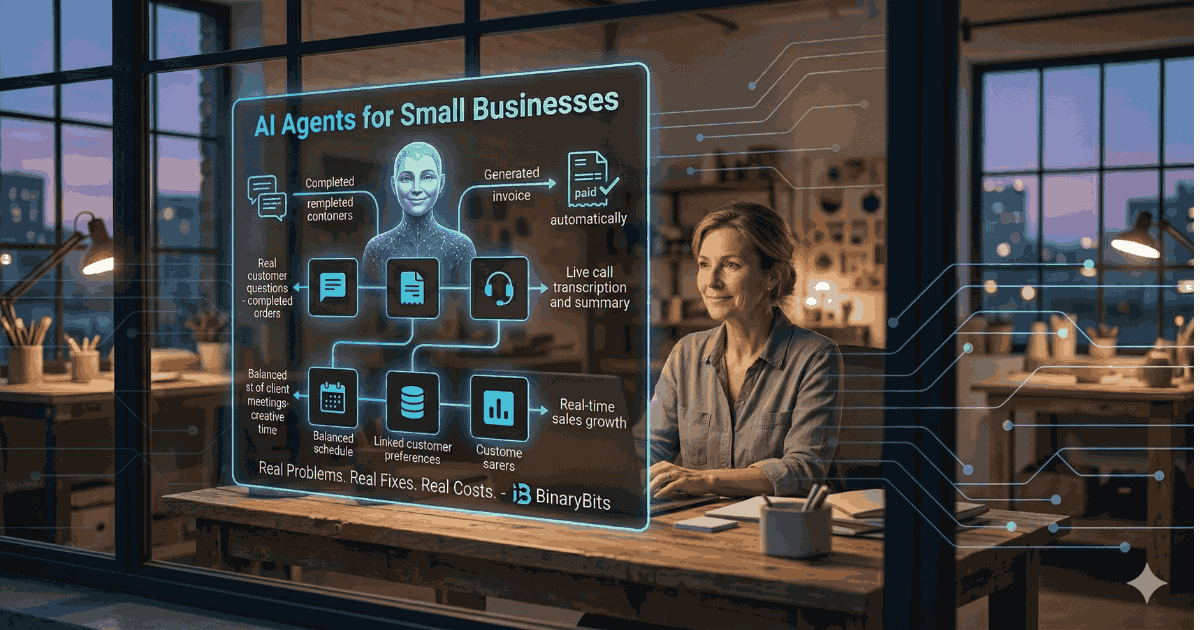
Most small business owners we talk to are not asking "should I use AI?" They're asking "why is my team still spending 3 hours a day on things a computer should be doing?" Answering emails that follow the same pattern. Chasing invoices. Copying data between systems. Booking appointments manually.
The problem isn't awareness. The problem is translation — no one has told them exactly which AI agent solves which specific problem, and what it costs to fix it.
💡 What you'll get from this post: Six real small business problems — drawn from our work across 200+ projects — with the exact AI agent fix, time saved per week, and cost comparison against doing it manually or hiring someone.
TL;DR
- AI agents are software that can reason, take action, and complete multi-step tasks without a human in the loop — they're not chatbots.
- Small businesses typically waste 15–30 hours per week on tasks that agents can handle for under $500/month.
- The six problems covered here — lead follow-up, invoice chasing, customer support, appointment booking, data entry, and stock monitoring — are the most common we see across retail, services, and e-commerce.
- We include a cost table for each so you can see the ROI before committing to anything.
What Is an AI Agent? (And Why It's Different From a Chatbot)
A chatbot responds. An AI agent acts.
When a customer messages your chatbot, it produces a response. That's it. An AI agent goes further: it reads the message, decides what needs to happen next, checks your calendar, books the appointment, sends a confirmation email, and logs it in your CRM — all without anyone touching it.
The technical term for this is multi-step reasoning with tool use. In plain English: the agent can break a goal into steps, use your existing software to complete those steps, and handle exceptions when things don't go as expected.
💡 The one-sentence version: A chatbot is a Q&A machine. An AI agent is a junior employee who never sleeps, never forgets, and doesn't need onboarding after the first week.
With that out of the way — here are the six problems we see most often in small businesses, and how an agent fixes each one.
Problem 1: Leads Come In, Nobody Follows Up Fast Enough
The Real-World Situation
A plumbing company in Manchester was getting 40–60 inbound enquiries per week through their website contact form. Their office manager would respond within 24–48 hours. By then, 30–40% of those leads had already called someone else.
This isn't a people problem. It's a speed problem. Research consistently shows that responding to a lead within 5 minutes makes you 21x more likely to convert them than responding within 30 minutes. A human can't monitor a contact form at 11pm on a Saturday. An AI agent can.
The Agent Fix
We built a lead response agent that monitors the contact form, reads the enquiry, generates a personalised reply (based on the service mentioned, location, and urgency), and sends it within 90 seconds — 24 hours a day, 7 days a week. It also logs the lead in their CRM and assigns a follow-up task to the human team for the next working day.
| Cost Comparison | Manual (office manager) | AI Agent |
|---|---|---|
| Response time | 24–48 hours (business hours only) | Under 90 seconds (24/7) |
| Leads lost to slow response | ~35% per month | ~5% per month |
| Staff time per week | 4–6 hours | 20 minutes (review only) |
| Monthly cost | ~£300–£500 in staff time | ~£80–£150/month (running cost) |
| Extra revenue potential | Baseline | +£1,200–£4,000/month from recovered leads |
For the plumbing company, recovering even 10 additional jobs per month at an average value of £180 each meant £1,800 in additional monthly revenue — against an agent running cost of under £120/month. The math is straightforward.
Problem 2: Invoice Chasing Is Eating the Owner's Time
The Real-World Situation
A 12-person digital agency in Sydney had £80,000 in outstanding invoices at any given time. Their founder was spending 6–8 hours per week manually checking payment statuses, writing follow-up emails, and updating their accounting software. Not billable hours. Admin hours.
They knew they needed to be more consistent about chasing. But every week, other priorities took over — and some clients were waiting 60+ days to pay on 30-day terms.
The Agent Fix
An invoice chasing agent connects to their accounting software (Xero, QuickBooks, FreshBooks — all have APIs), monitors invoice due dates, and sends tiered follow-up sequences automatically. Polite reminder at day 1 overdue. Firmer follow-up at day 7. Escalation flag to the founder at day 14 with a draft email ready to send.
| Cost Comparison | Manual (founder time) | AI Agent |
|---|---|---|
| Time spent weekly | 6–8 hours | 30 minutes (exception review) |
| Consistency of follow-up | Inconsistent (other priorities win) | 100% — every invoice, every time |
| Average days to payment | 52 days | 34 days (based on our client data) |
| Monthly cost | ~$600–$900 in founder time at market rate | ~$100–$180/month (running cost) |
| Cash flow improvement | Baseline | £15,000–£25,000 freed from 60+ day cycles |
The agency recovered an average of 18 days of payment time per invoice after deploying this agent. For a business with £80K in monthly billings, that's real cash flow — not a theoretical saving.
Problem 3: Customer Support Is Drowning the Team
The Real-World Situation
An e-commerce store selling handmade furniture in the US was receiving 200–250 customer messages per week. "Where is my order?" "Can I change the delivery address?" "Is this item in stock in oak?" Sixty percent of those messages were variations of the same 8 questions.
Two part-time support staff were spending most of their working hours answering messages that required no human judgment at all. The genuinely complex questions — custom orders, delivery disputes, product defects — were getting delayed because the team was buried in repetitive work.
The Agent Fix
A customer support agent connected to their Shopify store, shipping provider API, and inventory system. It handles order status queries instantly, can update delivery instructions, checks real-time stock, and escalates anything it can't confidently handle to a human with full context pre-filled.
We documented a similar build in our AI customer support case study — the numbers from that project are what informed our standard approach here.
| Cost Comparison | 2 Part-Time Staff | AI Agent + 1 Staff (complex only) |
|---|---|---|
| Messages handled per week | 200–250 (with delays) | 200–250 (immediate for 60%, human for 40%) |
| Average first response time | 4–8 hours | Under 2 minutes |
| Monthly staff cost | $3,200–$4,000 | $1,600–$2,000 (1 staff) + $200–$350 agent cost |
| Monthly saving | Baseline | $850–$2,200/month |
| Customer satisfaction | 3.6/5 (response delays) | 4.4/5 (speed improvement) |
Problem 4: Appointment Booking Is a Back-and-Forth Nightmare
The Real-World Situation
A physiotherapy clinic in Melbourne had a receptionist spending 3 hours per day on appointment scheduling. Patient calls, messages on Instagram, emails — all coming in across different channels. Manual entry into their practice management software. Reminder calls the day before. Rescheduling when patients cancelled.
The receptionist was doing the work of a scheduling system, not a person. And the clinic was still getting 12–15 no-shows per month because reminder calls weren't always happening.
The Agent Fix
A booking agent handles incoming appointment requests across all channels (web form, WhatsApp, email), checks therapist availability in real time, books the slot, sends a confirmation immediately, and sends automated reminders at 48 hours and 2 hours before the appointment — with a one-click reschedule link.
| Cost Comparison | Manual Receptionist (scheduling tasks only) | AI Booking Agent |
|---|---|---|
| Time on scheduling daily | 3 hours | 15 minutes (exception handling) |
| No-shows per month | 12–15 | 3–5 (reminders improve show rate) |
| Revenue lost to no-shows | ~$2,400/month (at $160/session) | ~$640/month |
| Agent monthly cost | — | $150–$280/month |
| Net saving | Baseline | $1,500–$2,000/month (no-show reduction alone) |
The receptionist still exists — but now they spend their time on tasks that actually require a person. Patient queries that are sensitive. Complex rescheduling requests. In-clinic coordination.
Problem 5: Data Entry Between Systems Is Killing Productivity
The Real-World Situation
A small logistics company in the US was receiving orders via email, then manually entering them into their dispatch software, then copying the same data into their accounting system, then updating a spreadsheet for the owner's daily report. Three people, 2–3 hours each per day, on the same data moving between systems.
They knew it was inefficient. They'd been "planning to fix it" for two years. The cost of fixing it always seemed harder to justify than just continuing to do it manually.
The Agent Fix
A data processing agent reads incoming orders (from email, forms, or EDI files), extracts the structured data, pushes it into the dispatch software via API, triggers the accounting entry, and updates the owner's dashboard — automatically, in under 30 seconds per order.
This is one category where our AI process automation case study is directly relevant. We've run similar pipelines for clients processing 500–5,000 records per day.
| Cost Comparison | 3 Staff (manual entry) | AI Agent |
|---|---|---|
| Hours spent on data entry daily | 6–9 hours total | 0 hours (agent runs automatically) |
| Error rate | 2–4% (human error) | Under 0.3% (with validation rules) |
| Monthly staff cost (entry tasks only) | $1,800–$2,700 | — |
| Agent monthly cost | — | $200–$400/month |
| Net monthly saving | Baseline | $1,400–$2,300/month |
The three staff members were redeployed to customer-facing work. The company processed 18% more orders in the following quarter without adding headcount.
Problem 6: Stock and Pricing Decisions Happen Too Late
The Real-World Situation
A small retail business selling sports equipment online was monitoring competitor prices manually — one staff member checking 12 competitor sites, twice a week, logging prices in a spreadsheet. When a competitor ran a flash sale, they wouldn't know until 2–3 days later. By then, they'd lost the weekend's sales volume to cheaper alternatives.
They were also running out of fast-moving stock regularly because reorder decisions were based on gut feel, not data.
The Agent Fix
A market monitoring agent scrapes competitor pricing across their top 200 SKUs every 4 hours, alerts the buyer when a competitor drops below a threshold margin, and generates a weekly pricing report. A second layer monitors their own stock levels and sends a reorder recommendation when a product falls below a calculated safety threshold.
Our e-commerce price intelligence case study covers a version of this at larger scale — the architecture is the same for small businesses, just with fewer SKUs.
| Cost Comparison | Manual Monitoring | AI Monitoring Agent |
|---|---|---|
| Monitoring frequency | 2x per week | Every 4 hours |
| Staff time per week | 5–8 hours | 1 hour (review + decisions) |
| Competitor price reaction time | 48–72 hours | Under 4 hours |
| Stockouts per quarter | 8–12 events | 1–3 events |
| Monthly agent cost | — | $180–$350/month |
| Estimated revenue impact | Baseline | +$1,500–$4,000/month (recovered sales + fewer stockouts) |
Total Cost Savings Summary: What This Looks Like Together
If a small business implemented all six agents above, here's a realistic picture of the combined impact:
| Agent | Monthly Agent Cost | Monthly Saving / Revenue Gain |
|---|---|---|
| Lead follow-up | $100–$180 | $1,200–$4,000 (recovered leads) |
| Invoice chasing | $100–$180 | $400–$800 (founder time + cash flow) |
| Customer support | $200–$350 | $850–$2,200 (staff reduction) |
| Appointment booking | $150–$280 | $1,500–$2,000 (no-show reduction) |
| Data entry automation | $200–$400 | $1,400–$2,300 (staff time) |
| Stock and price monitoring | $180–$350 | $1,500–$4,000 (recovered revenue) |
| Total | $930–$1,740/month | $6,850–$15,300/month |
No small business needs all six at once. Most start with one or two that address their biggest pain point. The point of this table is to show the scale of opportunity — and that the cost of building and running these agents is a small fraction of what they return.
When AI Agents Don't Work for Small Businesses
We'd rather tell you when not to build an agent than oversell you on one that wastes your money.
- Your process isn't documented. An agent automates what you do. If you haven't defined exactly what "correct" looks like for a task, the agent will automate inconsistency. Fix the process first, then automate it.
- Your volume is too low. If you receive 10 customer enquiries per week, a support agent isn't worth building. Under 30 repetitive instances per week of any task, manual is probably fine.
- The task requires relationship judgment. An agent can send a payment reminder. It cannot decide whether a specific client relationship is too valuable to risk with an automated chase.
- Your systems have no APIs. Agents work by connecting to your existing software. If your CRM, accounting tool, or scheduling system doesn't have an API or webhook support, the integration cost rises significantly.
- You want a one-time build with no maintenance. Agents need monitoring. Budget for ongoing maintenance — typically 10–20% of build cost per year.
How to Start: The Right Sequencing for Small Businesses
- Identify the highest-cost manual task first. Not the most annoying — the most expensive in staff time or lost revenue. That's your first agent.
- Document the process in writing before any build starts. Walk through it step by step. Include exceptions.
- Start with read-only observation mode. For the first 2 weeks, run the agent in shadow mode — it logs what it would have done, but humans still execute.
- Scale the automation gradually. Let the agent handle 20% of cases fully automated. Review the output. Increase to 60%, then 100% once you're confident in accuracy.
- Measure the right things. Track time saved, error rate, response time, and the business outcome (leads converted, invoices paid, no-shows reduced).
Our AI agents service page covers our standard engagement model, including fixed-scope builds and ongoing support options.
If you know which of these six problems applies to your business and want a rough estimate, we're happy to scope it with you →
What Does It Actually Cost to Build an AI Agent?
| Agent Complexity | What It Typically Includes | Build Cost (one-time) | Monthly Running Cost |
|---|---|---|---|
| Simple | Single trigger, single action, one integration (e.g., contact form → CRM → email reply) | $800–$2,000 | $50–$150 |
| Medium | Multi-step workflow, 2–3 integrations, conditional logic | $2,500–$6,000 | $150–$350 |
| Complex | Multi-agent orchestration, 4+ integrations, ongoing learning loop, dashboard | $6,000–$18,000 | $300–$700 |
Running costs are made up of LLM API usage (GPT-4, Claude), hosting infrastructure, proxy costs if scraping is involved, and monitoring tools. Most small business agents we build fall in the simple to medium tier — typically $1,500–$4,000 to build and $100–$250/month to operate. Payback period is usually under 60 days.
Ready to Identify What to Automate First?
We help small businesses scope, build, and run AI agents that handle the repetitive work — so your team can focus on the work that actually grows the business. We've done this across 200+ projects in 10+ countries.
Show Me What Can Be Automated →Frequently Asked Questions
What is an AI agent for a small business?
An AI agent is software that can complete multi-step tasks automatically without human intervention. Unlike a simple chatbot that answers questions, an agent takes actions — booking appointments, sending emails, updating your CRM, chasing invoices — by connecting to your existing tools and making decisions based on the situation. The most common small business use cases are lead follow-up, customer support, appointment scheduling, data entry, and invoice management.
How much does it cost to build an AI agent for a small business?
Simple agents with one integration typically cost $800–$2,000 to build and $50–$150/month to run. Medium-complexity agents with 2–3 integrations run $2,500–$6,000 to build and $150–$350/month to operate. The payback period for most small business agents is 30–90 days, depending on how much staff time they replace and how much revenue they recover. We provide fixed-scope estimates before any build begins.
Do I need technical staff to manage an AI agent?
No. Once an agent is built and tested, it runs automatically. You'll receive alerts for exceptions — situations the agent couldn't handle confidently — and a monthly performance report. Most of our small business clients spend 30–60 minutes per week on agent oversight after the first 4 weeks of live deployment.
Can AI agents connect to the software I already use?
In most cases, yes. Agents integrate with software via APIs or webhooks. Common tools we connect to include Xero, QuickBooks, FreshBooks, Shopify, WooCommerce, HubSpot, Zoho CRM, Google Calendar, Calendly, Gmail, Outlook, WhatsApp Business, Slack, and most major practice management software. If your tool has an API, an agent can usually connect to it.
What's the difference between AI agents and traditional automation tools like Zapier?
Zapier and similar tools are rule-based: if X happens, do Y. AI agents handle judgment — they can read the content of an email, decide what type of request it is, choose from multiple possible responses, and escalate appropriately when something unusual occurs. For tasks where the input varies (customer messages, invoice disputes, lead enquiries), agents outperform rule-based tools. For simple, identical triggers and actions, Zapier may be sufficient and cheaper.
How long does it take to build and deploy an AI agent?
Simple agents typically take 1–2 weeks from scoping to live deployment. Medium complexity agents take 3–5 weeks. Complex multi-agent systems with custom dashboards take 6–12 weeks. We run a 2-week shadow mode phase on every build — the agent runs in observation mode before it takes live actions — which catches edge cases before they affect real customers or data.