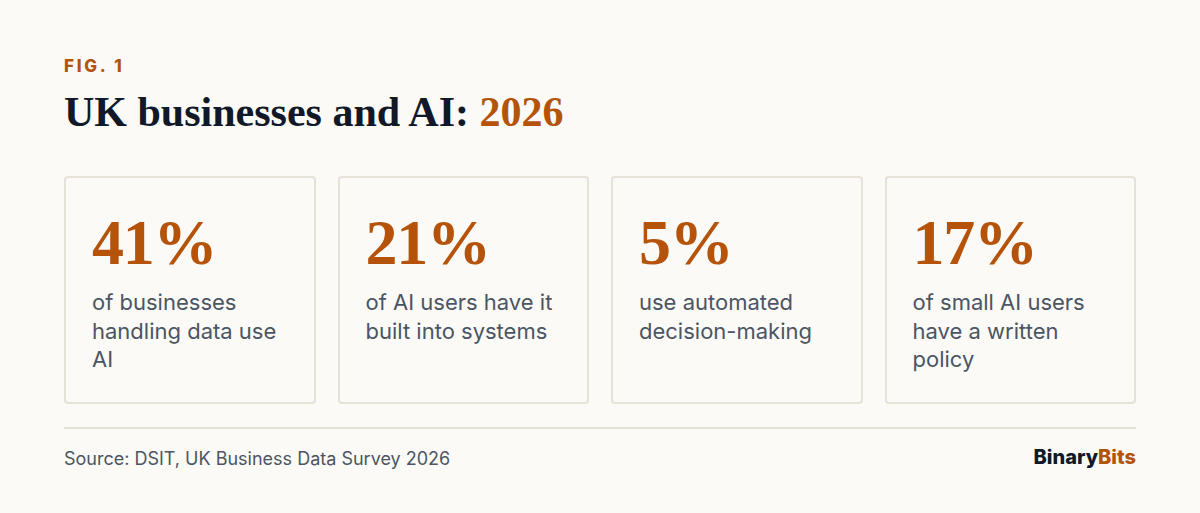
AI automation for business in the UK means AI doing a real task inside the systems you already run, such as Outlook, Xero or HubSpot, not just a chat window your team opens. Most UK firms aren't there yet: 41% of businesses use AI, but only 21% of those say it's built into their existing systems, according to the government's UK Business Data Survey 2026.
The fix is smaller than it sounds. Pick one repeated task, connect AI to the system where that task lives, keep a person on the exceptions, and check the UK GDPR rules before it makes decisions about people.
💡 What you'll get from this post: where UK businesses really are with AI, which task to automate first, how it's built, what it costs, and what the law asks of you since February 2026.
TL;DR
- 41% of UK businesses that handle digital data use AI, but only 21% of them have it inside their existing systems (DSIT, June 2026).
- Start with one high-volume, rule-based task: enquiries, invoice data, lead research or reporting.
- Build it into the tool the task already lives in, with a person approving anything unusual.
- Our builds start from £15 an hour, up to a fixed £1,000 a month for ongoing work.
- Automated decisions about people are allowed under UK GDPR since 5 February 2026, but only with safeguards.
What is AI automation for business in the UK?
AI automation is software that uses an AI model, such as OpenAI's GPT or Anthropic's Claude, to read, sort, write or decide something as one step in a business process, without a person copying and pasting between tools.
A few examples a UK business would recognise:
- Enquiries: an email arrives, AI reads it, tags it, drafts a reply and logs it in your CRM (customer relationship management system).
- Invoices: AI pulls the supplier, amount and VAT from a PDF and creates a draft bill in Xero for someone to approve.
- Leads: a new contact in HubSpot is researched and summarised before a salesperson calls.
- Reporting: sales and stock data are checked every morning and a short summary lands in Teams or Slack.
How is it different from using ChatGPT?
Using ChatGPT is a person asking a question and copying the answer somewhere. Automation means the AI is wired into the process: it's triggered by an event, works on your real data and writes the result back to the system of record. The person moves from doing the task to checking the odd case.
How many UK businesses use AI in 2026?
The best current figure comes from the Department for Science, Innovation and Technology (DSIT). Its UK Business Data Survey 2026, run by Ipsos between October 2025 and January 2026 and published in June 2026, found that 41% of businesses that handle digitised data use AI for at least one purpose.
Use climbs with size: 82% of large businesses, 58% of medium, 51% of small, 41% of micro businesses and 40% of sole traders. The most common use is researching information (28%), often in place of a search engine. Only 5% use automated decision-making, and among small AI users just 17% have a formal written AI policy (DSIT, sections 3.2 to 3.4).
Which businesses have AI built into their systems?
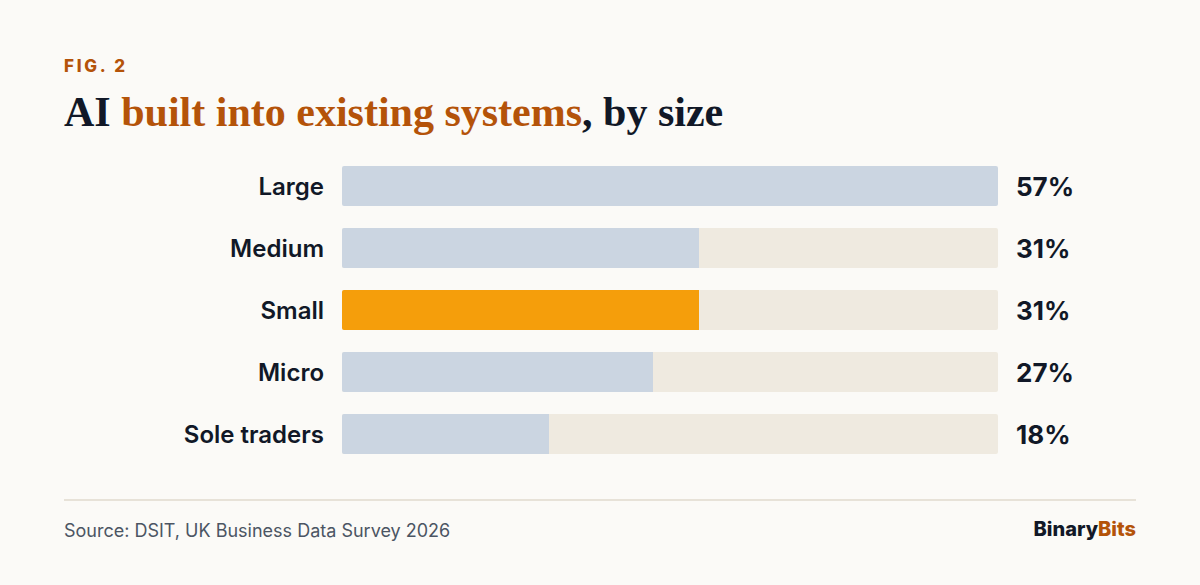
Here's the gap. Of the businesses using AI, only 21% say their AI tools are integrated into existing business systems such as Microsoft 365, a CRM or finance software. Large businesses are at 57%. Medium and small businesses are at 31%, micro businesses at 27% and sole traders at 18%, per the same DSIT survey.
Why does AI stay outside the systems you already use?
In our experience the reasons are practical, not technical:
- Nobody owns it. Staff use AI on their own, so it never becomes a process with an owner.
- The data is scattered. The task needs information from email, a spreadsheet and the accounts package, and nothing joins them.
- Off-the-shelf tools stop at the edge. A chatbot subscription doesn't know your price list or write to your CRM.
- Worry about data. Owners are unsure what UK GDPR allows, so customer data stays out of AI tools.
Large firms close the gap with in-house developers. Smaller firms usually need a small, scoped build: one connection, one task.
Which tasks should a UK SME automate first?
Start where a task is frequent, follows rules most of the time, and is done in one or two systems. Leave rare, judgement-heavy work until last.
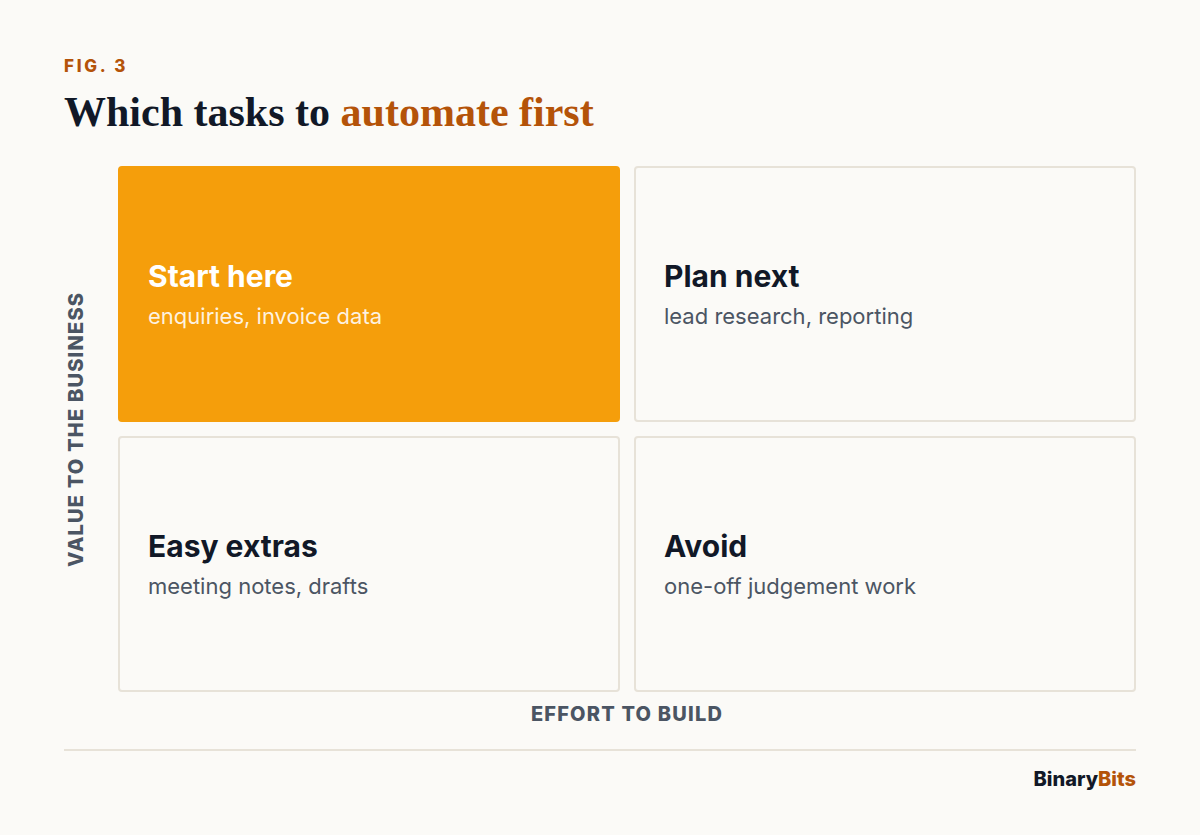
| Task | Where it lives | What AI does | Who checks |
|---|---|---|---|
| Customer enquiries | Outlook or Gmail, CRM | Sorts, drafts a reply, logs the contact | Staff approve replies |
| Supplier invoices | Email, Xero or QuickBooks | Reads the PDF, creates a draft bill | Finance approves |
| Lead research | HubSpot or Salesforce | Adds company facts and a summary | Salesperson reads it |
| Daily reporting | Sales and stock data | Spots changes, writes a summary | Manager reads it |
| Document checks | Shared drive, forms | Flags missing or odd fields | Staff fix the flags |
What makes a good first task?
- It happens at least daily, so the time saved adds up.
- You can say what a good result looks like.
- A mistake is cheap to catch before it reaches a customer.
- The data it needs is in a system with an API (a way for software to read and write it), which Microsoft 365, Xero and HubSpot all have.
How do you build AI into Microsoft 365, Xero or HubSpot?
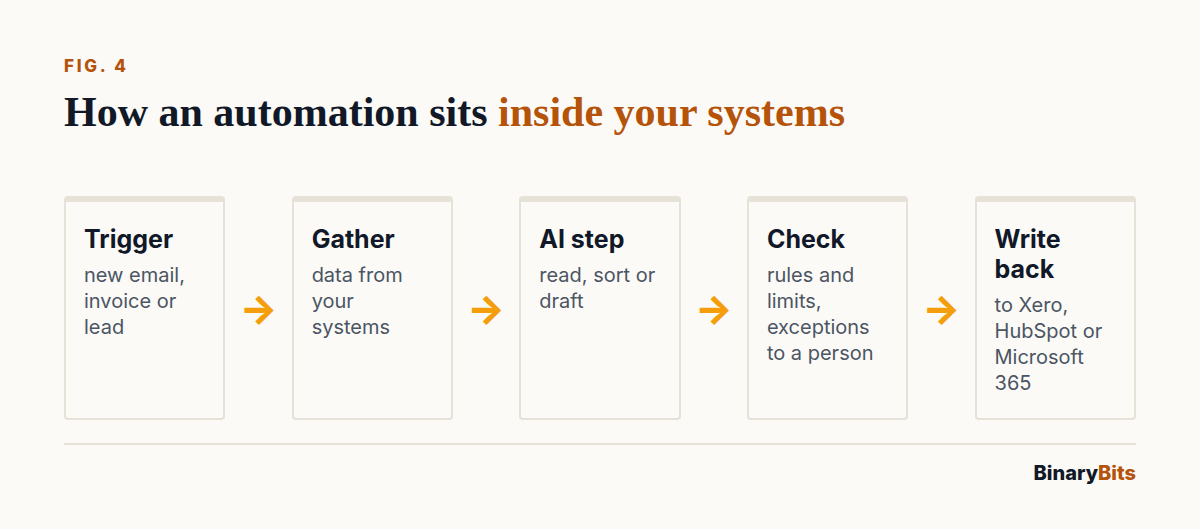
The build follows the same five steps whatever the tool:
- Map the task. Write down each step a person takes today, the inputs and where the result goes.
- Connect the systems. Use the official APIs to read the trigger (a new email, a new contact) and write the result back.
- Add the AI step. Give the model your rules, examples and the record it's working on, and ask for a fixed format back.
- Route the exceptions. Anything below a confidence level, or above a value limit, goes to a person.
- Run it alongside the team. Compare its output with the person's for a few weeks before it acts alone.
For more examples of processes that suit this, see five business workflows to automate with AI agents.
What does AI automation cost a UK business?
The cost depends on how much of it is custom. These are our own prices at BinaryBits, as of October 2026:
| Option | What you pay | Good for |
|---|---|---|
| AI features in tools you have | The vendor's per-user licence | Drafting and summaries inside one app |
| Hourly build with us | From £15 an hour | One scoped automation, small changes |
| Fixed monthly with us | Up to £1,000 a month, fixed | Several automations, ongoing upkeep |
| In-house developer | A full UK salary | Firms with lots of systems to connect |
These are starting points, not fixed packages. If your scope doesn't fit them, we'll agree a price around the task.
What else will you pay for?
- AI model usage: billed by the provider per amount of text processed. For one task it's usually small, but check it on real volumes during the trial.
- Hosting: a small server or cloud function to run the automation.
- Upkeep: APIs and models change, so plan for a few hours a month.
Not sure which task to start with? We'll look at your process and tell you what's worth automating, through our AI agents and workflow automation service →
What does UK GDPR say about automated decisions since February 2026?
If your automation makes a decision about a person with no human involved, such as approving a refund or rejecting an applicant, the rules changed on 5 February 2026. The Data (Use and Access) Act 2025 replaced Article 22 of UK GDPR with new Articles 22A to 22D. Automated decisions are now allowed on any lawful basis, but you must put safeguards in place, as Travers Smith explains. Stricter rules still apply to special category data, such as health information.
The safeguards, in practice:
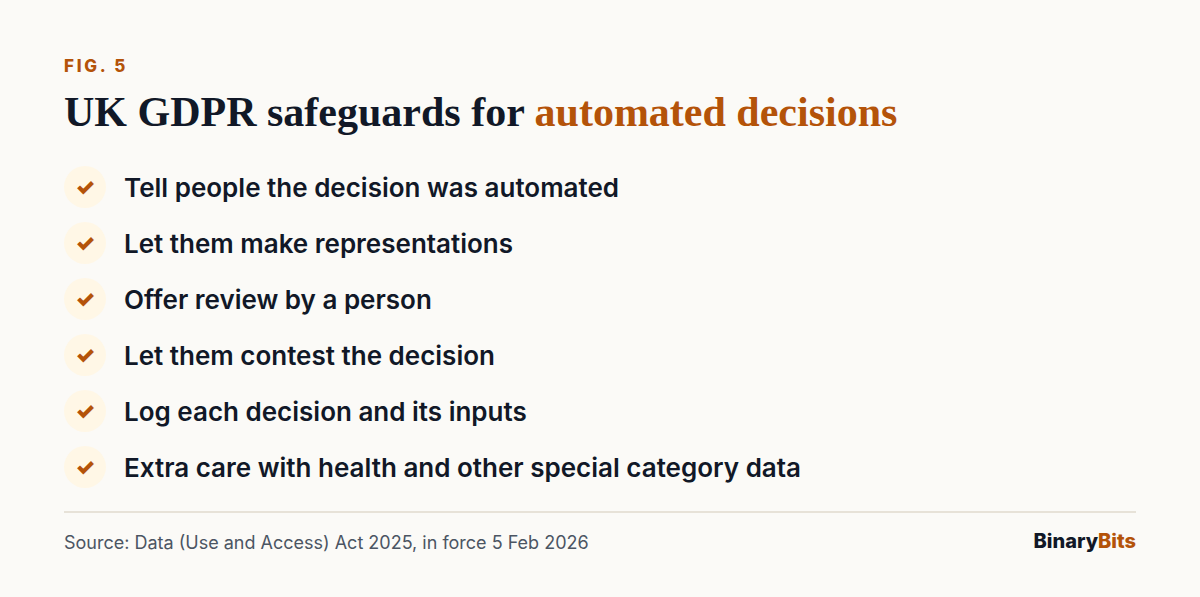
- Tell people a decision about them was made automatically.
- Let them make representations about it.
- Offer a person to review it.
- Let them contest the decision.
- Keep a log of each decision and what it was based on, so you can explain it.
The ICO's guidance on automated decision-making is being updated for the new rules, so check it before you launch. Most first automations avoid the question entirely by keeping a person on the final decision.
⚠️ Note: This is general information, not legal advice. For decisions about customers or staff, speak to a data protection adviser.
Which mistakes stop AI automation paying off?
- Automating five things at once. One working automation teaches you more than five half-built ones.
- No measure before you start. Time the task by hand first, or you can't show it saved anything.
- No human on the exceptions. AI models get things wrong sometimes. Design for that from day one.
- Keeping it in a separate tool. If staff must open another app, they'll stop using it.
- No owner. Someone has to read the error log and update the rules.
What does it look like in a real project?
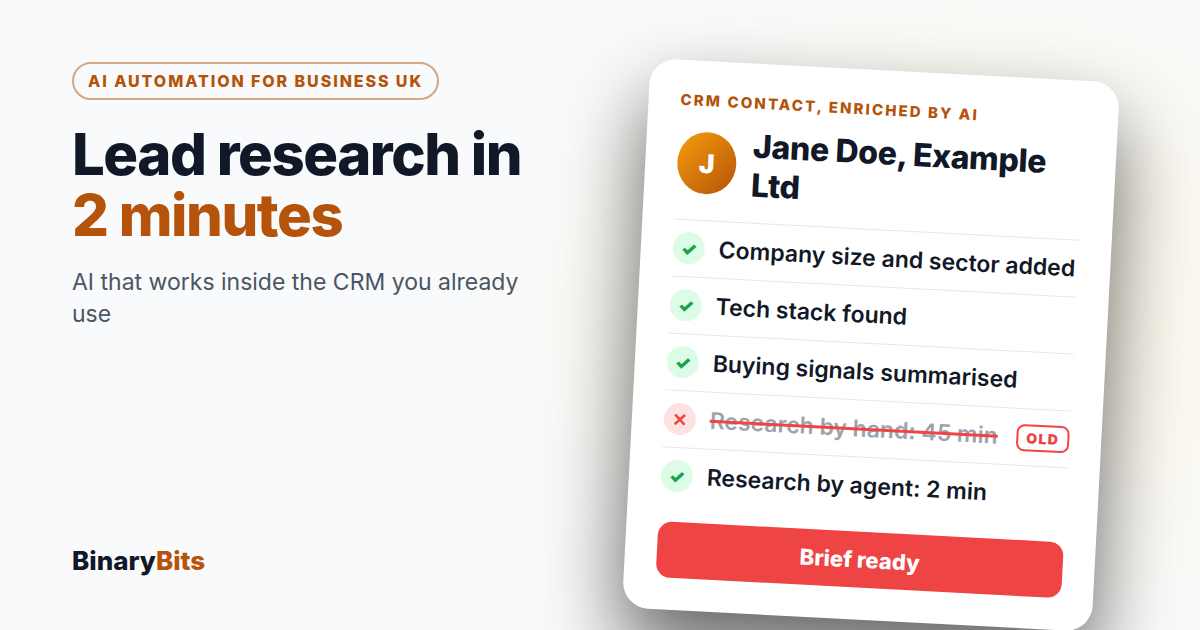
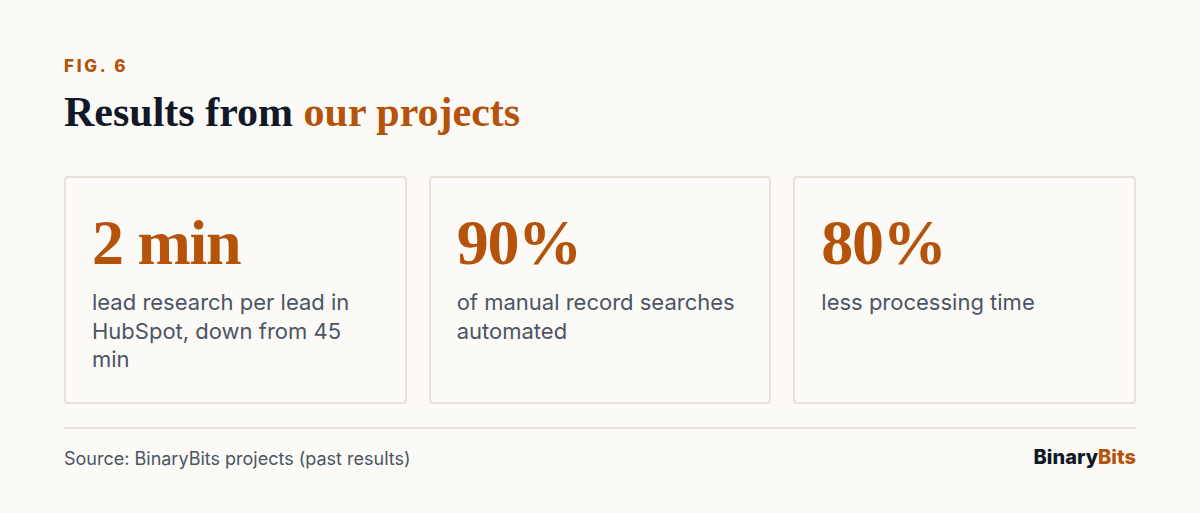
For a B2B software company, we built an AI lead enrichment agent that works directly in HubSpot. When a lead comes in, it gathers company data, the person's profile, the tech stack and buying signals, and writes a brief to the record. Research time fell from 45 minutes to 2 minutes per lead, across our work on that project.
For a US background-check company, we automated 90% of the manual record searches and cut processing time by 80%, so the team could take on far more cases. Right now we're running an AI automation for a client that analyses their business data against their own requirements.
The honest limit: these worked because each task was narrow and repeated. AI automation is a poor fit for work that changes every time, or where one mistake is costly and hard to spot.
Should you build it, buy a tool or hire a partner?
- Buy a tool if the task lives in one app and its built-in AI covers it. Don't pay anyone to build what Microsoft 365 already does.
- Hire a developer if you have many systems and years of automation work ahead.
- Use a partner if you need one or two automations built into your systems and kept running.
BinaryBits is an engineering partner for startups, agencies and enterprises: AI agents, custom software and SaaS, backends and dedicated developer teams from India, delivered to Western standards. We've delivered 200+ projects for clients in 10+ countries, including the UK. Our working day overlaps with yours: a UK morning is our afternoon. If you need more than one build, a dedicated developer team is the other option.
Get one task automated inside your own systems
We build AI automations that work in Outlook, Xero, HubSpot and your own software, with a person on the exceptions. Book a free 30-minute call: no pitch, just a conversation about your process.
Frequently asked questions
What is AI automation for business?
AI automation for business is software that uses an AI model to carry out one step of a business process on its own, such as reading an email, extracting invoice data or summarising a lead, and writes the result back into the system you already use. Unlike asking ChatGPT a question, it's triggered automatically, works on your real data and only needs a person for the unusual cases.
How do I start with AI automation in my business?
Start with one task that happens daily, follows clear rules and lives in one or two systems, such as customer enquiries or supplier invoices. Time how long it takes by hand, connect AI to that system, and keep a person approving the output for the first few weeks. Once it's reliable, move to the next task. Avoid starting five automations at once.
How long does AI automation take to set up?
It depends on how many systems the task touches and how clean the data is. A single automation connected to one tool, such as HubSpot or Xero, is far quicker than one joining email, spreadsheets and accounts. Plan for a trial period where the AI runs alongside your team before it acts alone. We give a time estimate after we've mapped the task.
How much does AI automation cost a UK small business?
At BinaryBits, builds start from £15 an hour for a scoped automation, up to a fixed £1,000 a month for several automations with ongoing upkeep, and we'll adjust to your scope. On top, you pay the AI provider for usage, which depends on volume, and a small amount for hosting. AI features already inside your software cost only their per-user licence, so check those first.
Is AI automation legal under UK GDPR?
Yes, with conditions. Since 5 February 2026, the Data (Use and Access) Act 2025 allows automated decisions about people on any lawful basis, provided you tell them, let them respond, offer human review and let them contest the decision. Stricter rules apply to special category data such as health. Keeping a person on the final decision is the simplest route. This isn't legal advice.
Which AI agents work for small business automation?
For small business automation, the AI agents that work best are narrow ones tied to a single job: an enquiry agent in your inbox, an invoice agent in Xero, or a research agent in your CRM. General-purpose assistants help individuals but don't change the process. Our guide to AI agents for small businesses covers real fixes and costs.