🏠 Built for our own companies✅ In daily use🤖 AI agents + full-stack
An AI Email Manager That Writes, Sends, Answers and Books Meetings
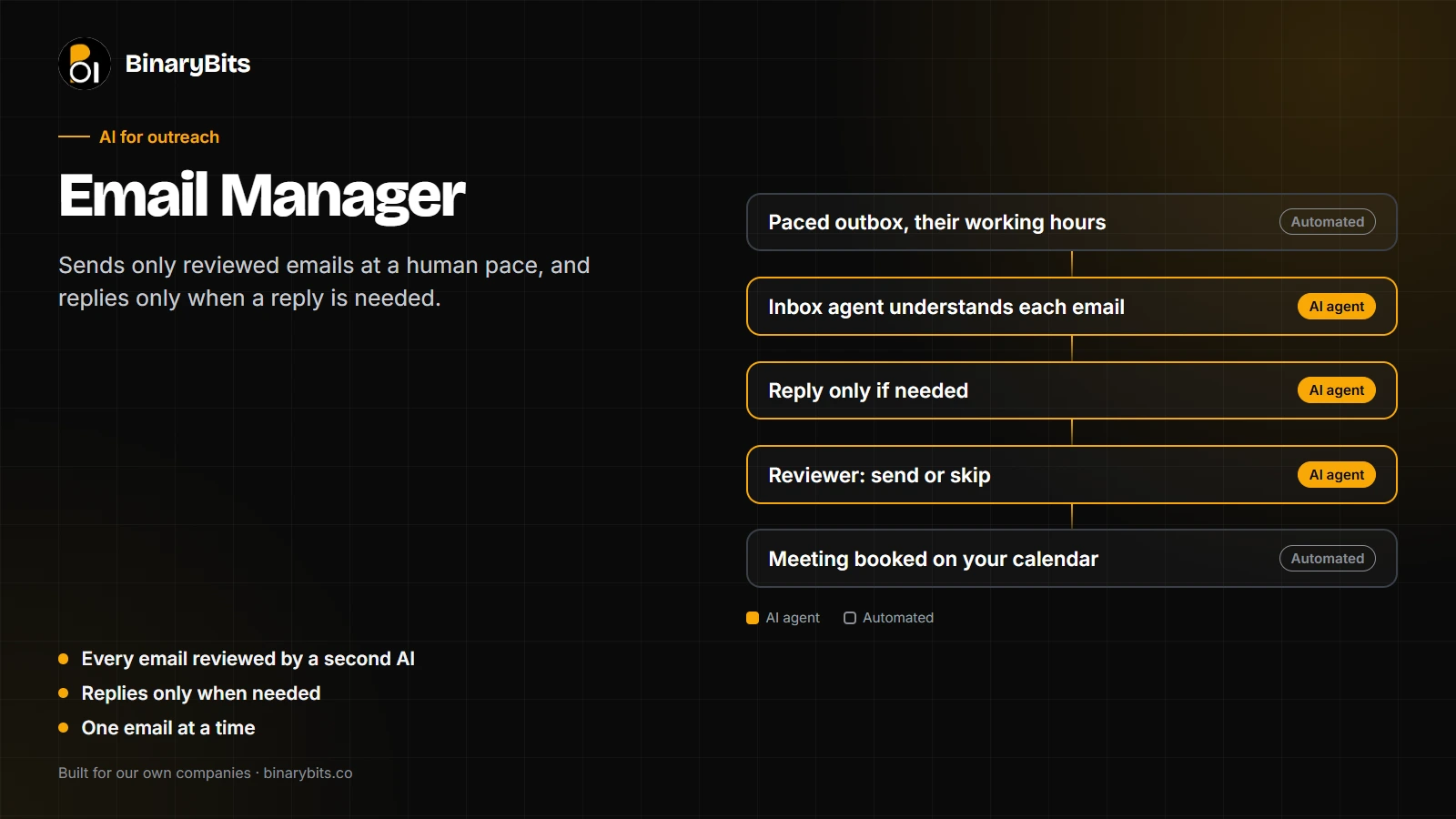
Sends only reviewed emails at a human pace, reads every reply, answers only when an answer is really needed, and books meetings. Built for our own companies and used every day.
Reviewed
Every email reviewed by a second AI
When needed
Replies only when needed
1 at a time
One email at a time, at a human pace
📋 The problem
Outreach email fails in two ways
Careless sending damages the mailbox, and emails start landing in spam. Slow or robotic replies lose the people who are interested.
And replying to messages that don't need an answer wastes the mailbox's daily allowance and the reader's patience.
We needed an outbox that behaves like a careful person: it sends slowly, reads before it replies, and knows when to stay quiet.
🛠️ What we built
An outbox, an inbox agent and a reviewer
The Email Manager runs our outreach mailbox, from the first email to a booked meeting. It was built for our own companies, BinaryBits and TheDataHQ, and it is used every day. These are its main parts.
app.example.com/email-manager
● Sending, paced
📤 Outbox one at a time · their working hours
Intro · Acme Datanext · 4m 12s
To jane@example.com · reviewed ✓
Follow-up · Umbrella Coqueued
To riya@example.com · same thread · stops if they reply
Reply · Initechwaits for their morning
To alex@example.com · reviewed ✓
Sam Lee · Globex LabsMeeting booked
Booked through the owner's own link · owner told on Telegram
💬 Jane Doe · Acme Data lead page · conversation
Us · introduction
Hi Jane, I saw Acme Data is moving its reporting to a new stack. Happy to share how we handled a similar move, if that's useful.
Jane Doe · reply
Thanks, that's kind of you. We're sorted for now, but I'll keep you in mind.
Inbox agent: a polite close, no question asked. Reviewer: skip, no reply needed. Follow-ups stopped.
Asked the owner: another lead wants a trial price. Sent to Telegram with a safe default if there's no answer in time.
The product screen, shown with test data. Real screens use the same layout.
📤
Paced sending
Through the official Gmail API, one email at a time, with natural gaps, only in the recipient's working hours.
🌱
A gradual warm-up
A new mailbox is warmed up gradually, built on real two-way conversations.
🧠
Understanding before replying
An inbox agent reads each email in its full context and decides whether it needs an answer at all.
✅
A reviewer for every reply
A second agent checks each reply before it goes, and either sends it or skips it, always with the reason.
↩️
Follow-ups that know when to stop
Sent in the same thread, and they stop the moment someone replies.
📅
Meetings
The person's own booking link is offered, and bookings are recognised automatically.
📱
Decisions only a person can make
Prices, trials and commitments are asked of the owner on Telegram, with a safe default if there is no answer in time.
🧪
A test week before going live
Everything ran for real except the recipient. Emails went to the owner's own addresses and said who they would have gone to.
🛑
Safety
Bounces and errors pause sending, a lost sign-in raises an alert at once, and unsubscribes are respected immediately.
🔄 How it works
From checked email to booked meeting
AI agents decide and review, automated steps send and track, and the owner decides anything that commits the business.
1
Emails enter the outbox
Only emails that have already been written and reviewed, by the Job Hunter or the Relationship Manager, can enter the outbox.
2
They're sent one at a time
The outbox sends one email at a time through the Gmail API, with natural gaps, and only during the recipient's working hours.
3
Replies are read and understood
The inbox agent reads each reply in the context of the whole conversation, not as a single message.
4
A reply is written only if needed
If the email needs an answer, a reply is drafted in the same thread. If it doesn't, nothing is written and follow-ups stop.
5
The reviewer checks it
A second agent checks every reply and decides to send or skip it, always writing down why.
6
It's sent
Approved replies go back through the same paced outbox, so even replies keep a human pace.
7
Meetings are booked, and the owner is told
The owner's booking link is offered when someone wants to talk. Bookings are recognised automatically and the owner hears about them on Telegram.
🤖 The AI approach
Understand first, then act
Every decision is logged with its reason. One AI does the work, a second AI checks it, and a person decides anything that commits the business. The agents run on Anthropic's Claude, through Claude Code skills.
Who
What it does
Inbox agent (AI)
Reads every incoming email in the context of the whole conversation and decides whether it needs an answer at all.
Reply writer (AI)
Drafts a reply in the same thread, only when one is needed.
Reviewer (AI)
Checks every reply before it goes, then sends it or skips it, with the reason written down.
Outbox (automated)
Sends one email at a time with natural gaps, in the recipient's working hours, and pauses on bounces or errors.
The owner (person)
Decides prices, trials and commitments when asked on Telegram. A safe default applies if there is no answer in time.
Quality
A second AI checks the first, so mistakes are caught before an email leaves the mailbox.
People stay in control
It only ever replies to known conversations. Anyone else, and anything that commits the business, goes to the owner.
Safety
Bounces and errors pause sending, a lost sign-in raises one alert, and unsubscribes are respected immediately.
Tested before it was trusted
A full test week ran every part on real data, with the owner's own addresses standing in for the recipients.
⚙️ Technology
Technologies used
Official public APIs, our own Python code, and AI agents built on Anthropic's Claude.
Several emails sent in the same minute pushed a new mailbox's emails into spam.
✓ What we did
Built a paced outbox, with one email at a time and natural gaps.
Result: Sending that looks human.
❌ Challenge
A lost sign-in failed quietly overnight.
✓ What we did
It now fails loudly, with one alert and no endless retries. Emails stuck by it go back in the queue automatically.
Result: Nothing lost, and the owner knows at once.
❌ Challenge
Replies to messages that didn't need one.
✓ What we did
Understanding comes first, and a reviewer second, with no fixed rules.
Result: Fewer, better replies.
❌ Challenge
Replies to strangers.
✓ What we did
It only ever replies to known conversations; anyone else goes to the owner.
Result: No surprises.
📈 Results so far
Live, after a full test week
Daily
Sending and answering real email
1 week
Test run on real data, with test recipients, before going live
Every reply
Checked by a second AI before it is sent
The Email Manager is in daily use, sending and answering real email after a test week in which every part ran on real data with test recipients. Business results, such as replies and meetings, will be added here once they are measured.
Last updated: November 2026
💡 For your business
What this means for you
The same approach works for any team that handles a lot of email and cannot afford careless replies.
An AI inbox assistant for sales or support. Reads every message in context, drafts replies only when needed, and has them checked before they go.
Outreach that protects your deliverability. Paced, reviewed sending that keeps a new or busy mailbox out of spam.
Email triage that knows when to stay quiet. Fewer, better replies, with every decision logged and explained.
For a client we would connect it to Google Workspace or Microsoft 365, your CRM and your own approval rules. For client systems we build on PostgreSQL, MySQL, MongoDB or Redis, and cloud data warehouses where needed, chosen for the project's scale and team. See our AI agent development services.
❓ FAQ
Frequently asked questions
Will it spam people?
No. Every email is reviewed, sending is paced and limited, and unsubscribes are respected immediately.
Does it reply to everything?
No. It first decides whether an email needs an answer, and a reviewer checks every reply.
Can it agree to prices or deals?
No. Anything that commits the business goes to a person first.
What happens if something breaks?
Sending pauses and the owner is alerted. Nothing is lost.
An inbox that answers well, and only when it should?
We build AI email systems with review, pacing and your rules built in.
We use analytics and functional cookies to understand how visitors use our site and to improve your experience.
No advertising cookies. Read our Privacy Policy.
BinaryBits
Cookie Preferences
Choose which cookies you allow. Strictly necessary cookies are always active — they keep the site working.
All other categories are off by default until you enable them.
You can change your preferences at any time by clicking the 🍪 icon.
Learn more in our Privacy Policy.
Strictly NecessaryAlways Active
Session · Security
These cookies are essential for the website to function. They enable core features like security, session management and accessibility. They cannot be disabled.
Analytics
Google Analytics 4 (GA4)
Help us understand how visitors navigate the site — which pages are most useful, where visitors come from, and how long they stay. All data is anonymised and aggregated. No personally identifiable information is stored.
Functional
HubSpot CRM Tracking
Associates your contact form submission with your browsing session in our CRM so we can personalise our response to your enquiry. No data is sold or used for advertising. Disabling this does not affect your ability to contact us — your form submission still reaches us.
Marketing
Meta Pixel (Facebook / Instagram Ads)
Used to measure the effectiveness of our advertising campaigns on Meta platforms. If you've arrived via a Facebook or Instagram ad, this cookie helps us understand which campaigns drive enquiries. We do not use this to build advertising profiles or target you.